Documents
You just extracted structured data from photos. PDFs are the same problem — images with text trapped in them. A scan, a posted notice, a 500-page FOIA dump.
OCR with an LLM
OCR stands for Optical Character Recognition, which just means "get the text out of an image." Send a photo (of a document or otherwise) to an LLM. Get structured text back.
Let's try with a PNG of a letter.
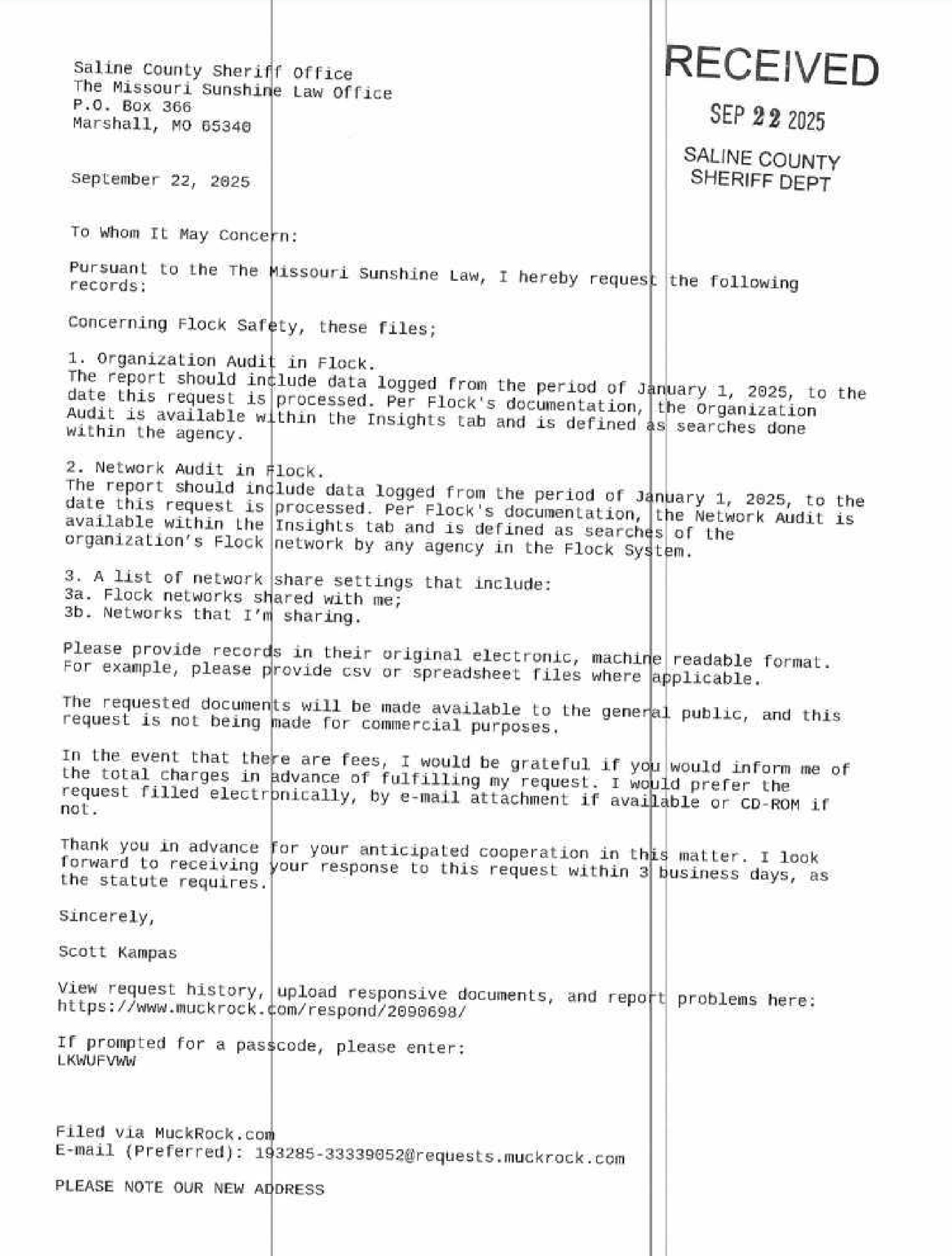
It's not an ideal scan - off angles, a little fuzzy, weird lines going through it. How will it do?
documents/llm-ocr.py — Send an image to an LLM and get structured text extraction back
from pathlib import Path

from pydantic import BaseModel, Field
from pydantic_ai import Agent, BinaryContent

DATA = Path("data")
MODEL = "openai:gpt-5-nano"
IMAGE = DATA / "flock-scan.jpg"

agent = Agent(MODEL)
image_data = IMAGE.read_bytes()

result = agent.run_sync([
    "Extract all visible text from this image. Preserve layout and reading order.",
    BinaryContent(data=image_data, media_type="image/jpeg"),
])

print(result.output)
RECEIVED
SEP 22 2025
SALINE COUNTY
SHERIFF DEPT

Saline County Sheriff office
The Missouri Sunshine Law Office
P.O. Box 366
Marshall, MO 65340

September 22, 2025

To Whom It May Concern:

Pursuant to the The Missouri Sunshine Law, I hereby request the following records:

Concerning Flock Safety, these files;

1. Organization Audit in Flock.
The report should include data logged from the period of January 1, 2025, to the date this request is processed. Per Flock's documentation, the Organization Audit is available within the Insights tab and is defined as searches done within the agency's Flock System.

2. Network Audit in Flock.
The report should include data logged from the period of January 1, 2025, to the date this request is processed. Per Flock's documentation, the Network Audit is available within the Insights tab and is defined as searches of the network by any agency in the Flock System.

3. A list of network share settings that include:
3a. Flock networks shared with me;
3b. Networks that I'm sharing.

Please provide records in their original electronic, machine readable format. For example, please provide csv or spreadsheet files where applicable.

The requested documents will be made available to the general public, and this request is not being made for commercial purposes.

In the event that there are fees, I would be grateful if you would inform me of the total charges in advance of fulfilling my request. I would prefer the request filled electronically, by e-mail attachment if available or CD-ROM if not.

Thank you in advance for your anticipated cooperation in this matter. I look forward to receiving your response to this request within 3 business days, as the statute requires.

Sincerely,

Scott Kampas

View request history, upload responsive documents, and report problems here:
https://www.muckrock.com/respond/2099698/

If prompted for a passcode, please enter:
LKWUFWww

Filed via MuckRock.com
E-mail (Preferred): 193285-33339052@requests.muckrock.com

PLEASE NOTE OUR NEW ADDRESS
Wonderful!
OCR a PDF
But as a journalist, you almost never need to recognize text in images - it's almost always in PDFs. The workflow that goes from PDF->LLM->OCR is a little more difficult than it should be, so I made a library called Natural PDF to help you do that.
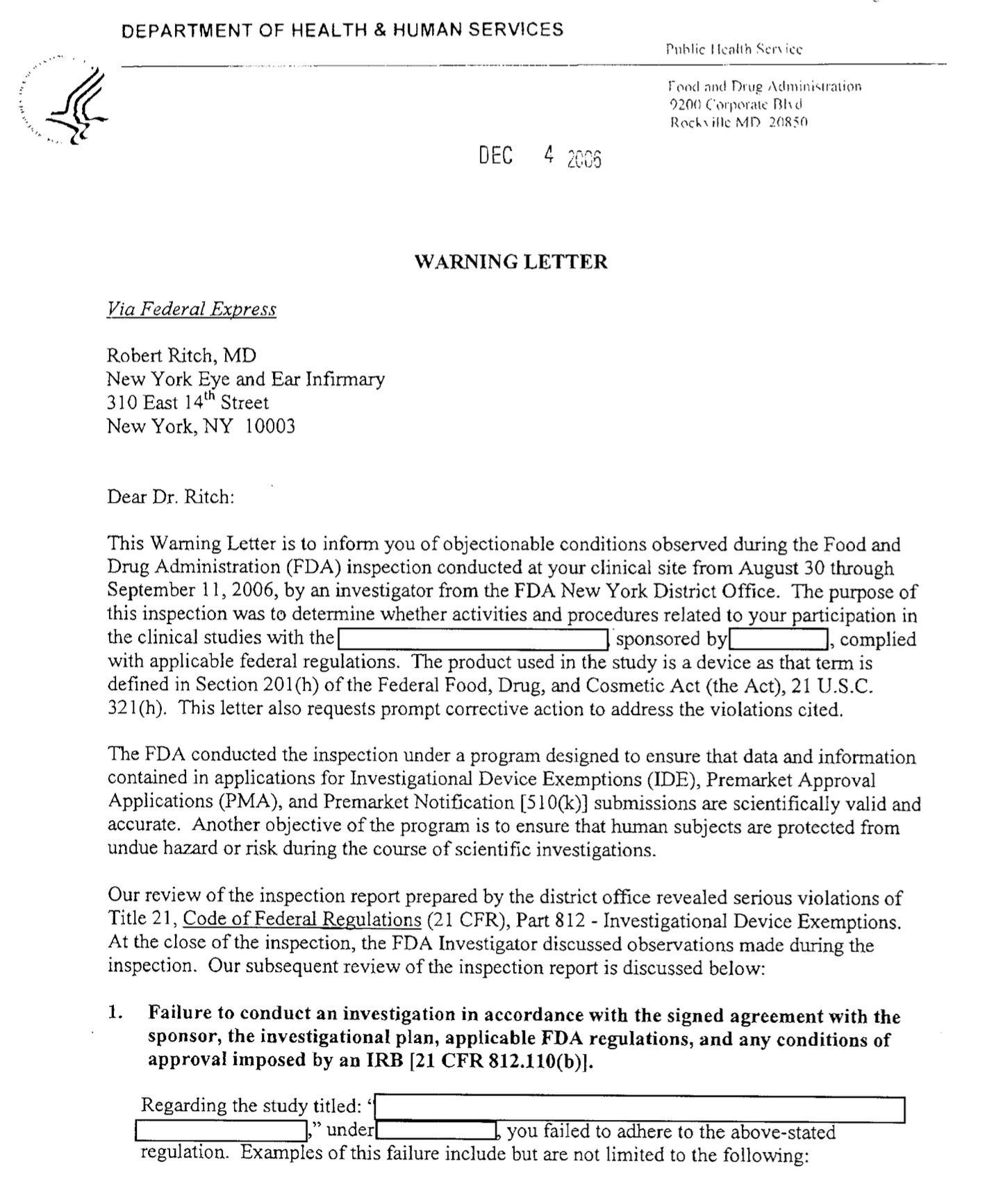
While you can use an LLM for OCR with Natural PDF you don't need to! Using one fo the built-in OCR engines usually works pretty well.
documents/pdf-ocr.py — Send an image to an LLM and get structured text extraction back
from pathlib import Path

from natural_pdf import PDF

DATA = Path("data")

pdf = PDF(DATA / "letter.pdf")
pdf.apply_ocr('easyocr')

print(pdf.extract_text())
Applying OCR: 0%| | 0/1 [00:00<?, ?it/s]
            DEPARTMENT OF HEALTH & HUMAN SERVICES


                                         DEC


                                   WARNING LETTER

           Via Federal Express

           Robert Ritch, MD
           New York Eye and Ear Infirmary
           310 East 14t Street
           New York; NY 10003


           Dear Dr, Ritch:

           This Waming Letter is t0 inform you of objectionable conditions observed during the Food and
           DrugAdministration (FDA) inspection conducted at ycur clinical site from August 30 through
           September 11, 2006,by an investigator from the FDA New York District Office. The purpose of
           this inspection was to determine whether activities and procedures related to your participation in

           the clinical studies with the           sponsored byL     complied
           with applicable federal regulations.The product used in the study is a device as that term is
           defined in Section 201(h) of the Federal Food, Drug; and Cosmetic Act (the Act); 21 U.S.C
           321(h}. This lelter also requests prompt corrective action to address the violations cited,

           The FDA conducted the inspection under a program designed to ensure that data and information
           contained in applications for Investigational Device Exemptions (IDE); Premarket Approval
           Applications (PMA), and Premarket Notitication [51O(k)] submissions are scientifically valid and
           accurate.Another objective of the program is to ensure that humnan subjects are prolecled from
           unduc hazard 0r riskduringthe course of scientific investigations_

           Our rcview of the inspection report prepared by the district office revealed serious violations of
           Title 21, Code of Federal Regulations (21 CFR), Part 812Investigational Device Exemptions
           At the closc of the inspection, the FDA Investigator discussed observations madeduringthe
           inspection _Our subsequent review of the inspection report is discussed below:

           1_ Failure to conduct an investigation in accordance with the signed agreement with the

              approval imposed by an IRB [21 CFR 812.110(b)}.

             Regarding the study titled:
                            under          you failed to adhere t0 the above-stated
             regulation   Examples Of this failure include but are not limited to the following:
Extract structured data from PDFs
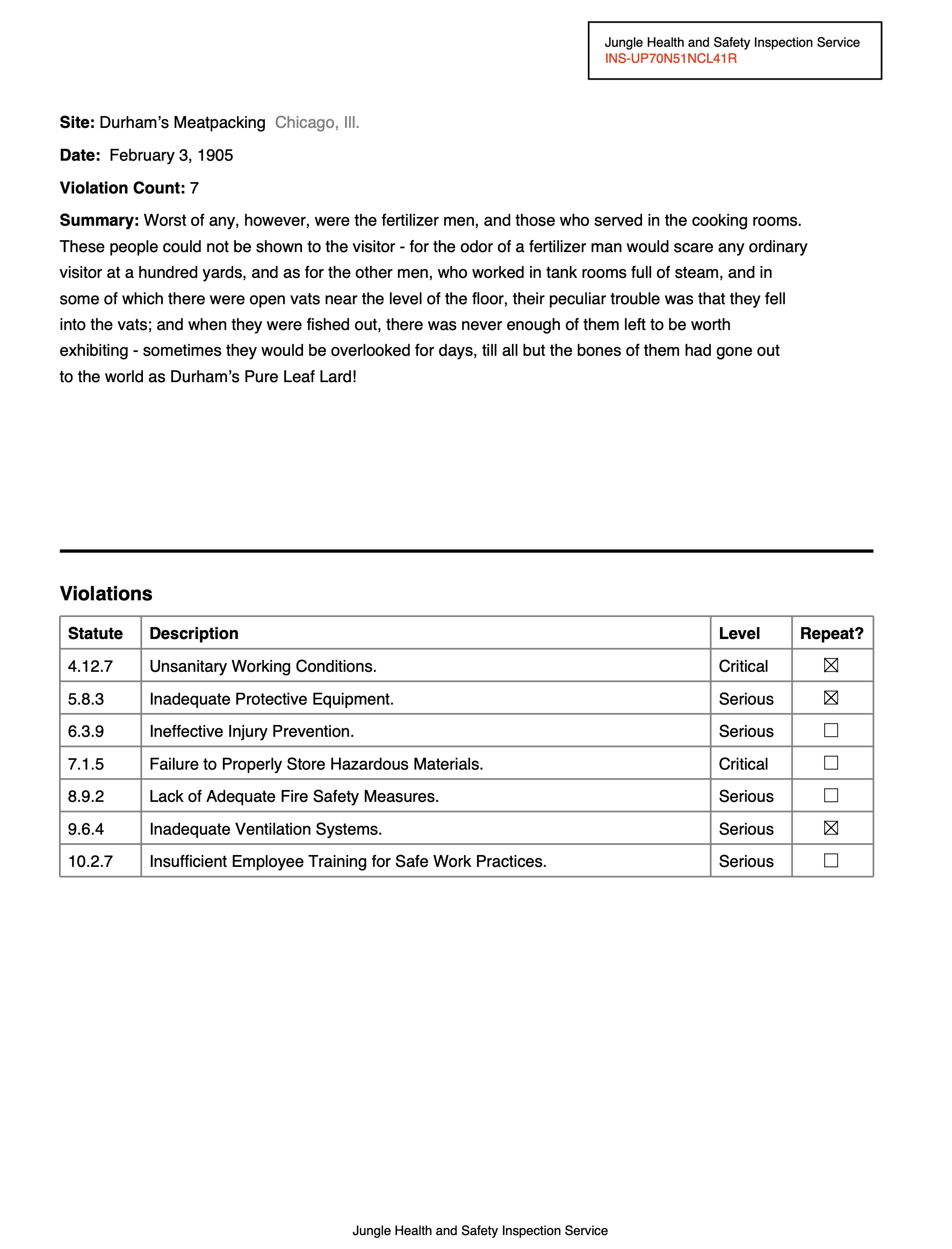
Natural PDF can also help you extract structured data from PDFs. In this example, we pull specific fields from a document page. Visual citations show exactly where on the page each answer came from — you can see what the model looked at.
documents/extract-pdf.py — Extract structured data from a PDF page with an LLM, with visual citations
from pathlib import Path

import os
from openai import OpenAI
from natural_pdf import PDF

URL = "https://github.com/jsoma/natural-pdf/raw/refs/heads/main/pdfs/01-practice.pdf"

client = OpenAI(
    api_key=os.environ["GOOGLE_API_KEY"],
    base_url="https://generativelanguage.googleapis.com/v1beta/openai/",
)

pdf = PDF(URL)
page = pdf.pages[0]

fields = ["site", "date", "violation count", "inspection service", "summary", "city", "state"]
results = page.extract(
    fields,
    client=client,
    model="gemini-2.5-flash",
    citations=True)
print(results.to_dict())
{'site': "Durham's Meatpacking", 'date': 'February 3, 1905', 'violation_count': '7', 'inspection_service': 'Jungle Health and Safety Inspection Service', 'summary': "Worst of any, however, were the fertilizer men, and those who served in the cooking rooms. These people could not be shown to the visitor - for the odor of a fertilizer man would scare any ordinary visitor at a hundred yards, and as for the other men, who worked in tank rooms full of steam, and in some of which there were open vats near the level of the floor, their peculiar trouble was that they fell into the vats; and when they were fished out, there was never enough of them left to be worth exhibiting - sometimes they would be overlooked for days, till all but the bones of them had gone out to the world as Durham's Pure Leaf Lard!", 'city': 'Chicago', 'state': 'Ill.'}
Here we go with some visual citations, highlights on the PDF show where each answer came from.
from IPython.display import display

display(results.show())

Extract with a Pydantic schema
Same extraction, but with a Pydantic schema for precise field control. Same pattern as the image demos — define your fields, the model fills them in.
documents/extract-pdf-pydantic.py — Extract structured data from a PDF using a Pydantic schema
from pathlib import Path

import os
from openai import OpenAI
from pydantic import BaseModel, Field
from natural_pdf import PDF

class ReportInfo(BaseModel):
    inspection_number: str = Field(description="The main report identifier")
    inspection_date: str = Field(description="Date of the inspection")
    inspection_service: str = Field(description="Name of inspection service")
    site: str = Field(description="Name of company inspected")
    city: str
    state: str = Field(description="Full name of state")
    violation_count: int
It isn't too interesting, but notice how we get the full state name now!
URL = "https://github.com/jsoma/natural-pdf/raw/refs/heads/main/pdfs/01-practice.pdf"

client = OpenAI(
    api_key=os.environ["GOOGLE_API_KEY"],
    base_url="https://generativelanguage.googleapis.com/v1beta/openai/",
)

pdf = PDF(URL)
page = pdf.pages[0]
result = page.extract(
    schema=ReportInfo,
    client=client,
    model="gemini-2.5-flash"
)

print(result.to_dict())
{'inspection_number': 'INS-UP70N51NCL41R', 'inspection_date': 'February 3, 1905', 'inspection_service': 'Jungle Health and Safety Inspection Service', 'site': "Durham's Meatpacking", 'city': 'Chicago', 'state': 'Illinois', 'violation_count': 7}
Classify pages visually
If you're trying to put content in rough categories, there are models that can do it for free! While they aren't perfect about nuance, if you're trying to split up invoices and photographs and love letters they can do a pretty good job. And they run on your own computer
Got hundreds of pages from a FOIA? Classify every page as diagram, text, invoice, blank — no API key needed. Then filter to just the ones you want.
documents/classify-pages.py — Classify pages of a PDF visually (diagram, text, invoice, etc.) using CLIP
from natural_pdf import PDF
from IPython.display import display

pdf = PDF("https://github.com/jsoma/ire25-natural-pdf/raw/refs/heads/main/cia-doc.pdf")

display(pdf.show(columns=5))

You can classify with either vision or text. In this case we'll see whether they're diagrams, text-heavy, invoices, or blank pages.
pdf.classify_pages(['diagram', 'text', 'invoice', 'blank'], using='vision')

for page in pdf.pages:
    print(f"Page {page.number}: {page.category} ({page.category_confidence:.2f})")
Classifying batch (openai/clip-vit-base-patch16): 0%| | 0/17 [00:00<?, ?it/s]
Page 1: invoice (0.51)
Page 2: text (0.97)
Page 3: text (0.95)
Page 4: diagram (0.90)
Page 5: diagram (0.91)
Page 6: invoice (0.97)
Page 7: text (0.89)
Page 8: invoice (0.79)
Page 9: invoice (0.97)
Page 10: invoice (0.98)
Page 11: invoice (0.99)
Page 12: invoice (0.99)
Page 13: text (0.88)
Page 14: text (0.93)
Page 15: diagram (0.93)
Page 16: text (0.82)
Page 17: invoice (0.95)
Amazing! You can then filter and show pages by category (this also works with entire PDFs!)
diagrams = pdf.pages.filter(lambda p: p.category == 'diagram')
print(f"\nFound {len(diagrams)} diagram pages")
diagrams.show(show_category=True)
Found 3 diagram pages

Up next: Audio. Same idea — turn it into text, then do text things.