Exclusions
Every scraping project meets the same enemies: headers, footers, watermarks, “CONFIDENTIAL” stamps — content that repeats on every page and pollutes every extraction. Exclusions are the library’s answer, and they work differently from what most people first assume.
A view, not a deletion
Section titled “A view, not a deletion”An exclusion never removes anything. The elements stay exactly where they are; an exclusion is a read-time filter. Each time you call extract_text(), find_all(), extract_table(), or apply_ocr(), the exclusion zones are evaluated and matching content is left out of that read. Think “show me the non-excluded view,” not “delete this region.”
Two consequences follow:
- Every read accepts
apply_exclusions=Falseto see the full, unfiltered page. Nothing is lost. - Exclusions defined as functions re-evaluate on each read, so they stay correct even after the page changes (say, after OCR adds elements).
Adding exclusions
Section titled “Adding exclusions”On a single page or region, pass a Region, an element, an ElementCollection, a selector string, or a list of any of those:
from natural_pdf import PDF
pdf = PDF("pdfs/01-practice.pdf")page = pdf.pages[0]
page.add_exclusion(page.region(0, 0, page.width, 60), label="letterhead");
On the whole PDF, pass a function that receives each page and returns a Region, a collection, or None (no exclusion on that page). This is the workhorse for repeating headers and footers:
pdf2 = PDF("pdfs/01-practice.pdf")pdf2.add_exclusion(lambda page: page.region(0, page.height - 25, page.width, page.height), label="footer");One binding-time detail worth knowing: a selector string or collection is resolved when you add it — the matched elements are stored. A callable is stored as-is and runs at read time, against whatever the page contains then. Page- and region-level callables stay bound to that registering host even when a derived view (such as a guide window) performs the read; PDF-level callables use each page as their host by design. If your exclusion should track content that might change (OCR, edits), use a callable. Inside the callable, exclusions are temporarily off, so lambda page: page.find(...) can’t recurse into itself.
method="element" is the surgical variant: instead of blanking a rectangle, it drops only the specific matched elements, leaving other elements that happen to overlap the same area visible.
Seeing what you’ve excluded
Section titled “Seeing what you’ve excluded”Exclusion bugs are geometry bugs. Render them before trusting them:
page.show(exclusions='red')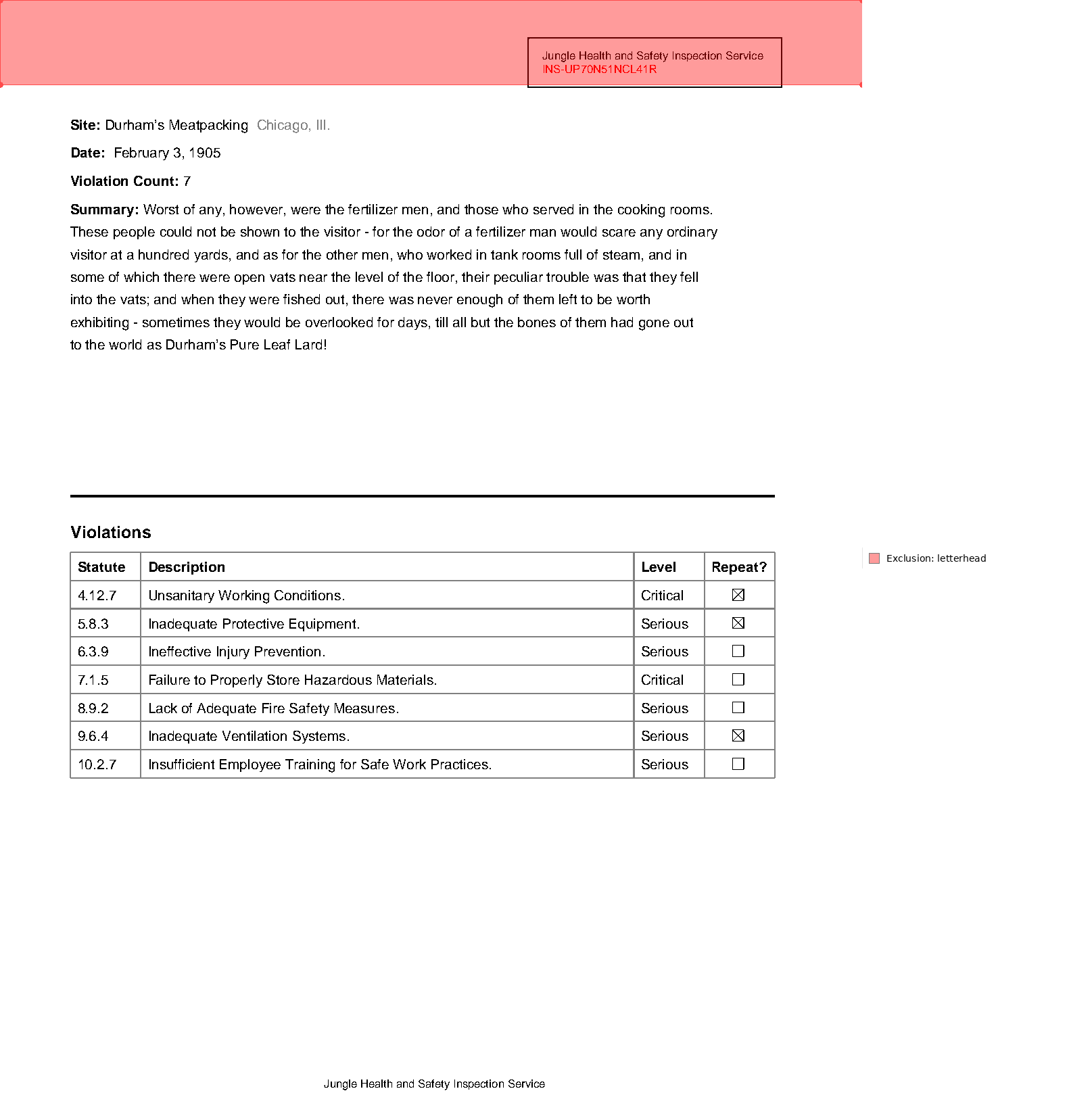
What honors exclusions
Section titled “What honors exclusions”Everything that reads content, by default:
print(page.extract_text()[:45]) # letterhead filtered outprint(page.extract_text(apply_exclusions=False)[:45]) # raw viewSite: Durham’s Meatpacking Chicago, Ill.
Date
Jungle Health and Safety Inspection Service
Iextract_text()skips words inside exclusion zones.find()/find_all()don’t return excluded elements — a selector that matches only inside an exclusion returns nothing (passapply_exclusions=Falseto look anyway).extract_table()ignores excluded rows/cells:
page.add_exclusion(page.region(0, 440, page.width, 460), label="oops, a data row")print(page.extract_table().to_df().shape) # a row went missingprint(page.extract_table(apply_exclusions=False).to_df().shape) # full table(7, 4)
(7, 4)- OCR masks exclusion zones out of the image before it reaches the engine — excluded content isn’t just filtered from results, it is never shown to the OCR model at all.
- Spatial navigation respects them too: an
until=selector won’t anchor on an excluded footer (see The Spatial Model).
When not to use exclusions
Section titled “When not to use exclusions”- When you want one area, not “everything except.” If the answer lives in a known region,
page.region(...)oranchor.below(...)and extracting from that is more direct than excluding the rest of the page. - When the “noise” is actually data. The table example above is the failure mode: an exclusion overlapping a data region silently thins your table. Rows just vanish, with no error. If a table extraction comes up short, check
page.show(exclusions='red')before blaming the table engine. - When you’re debugging. Exclusions apply to nearly every read, which makes them invisible-by-design — and that’s disorienting when a selector “should” match.
apply_exclusions=Falseandshow(exclusions='red')are the two switches that make the hidden state visible. (The interactivepage.viewer()deliberately shows excluded elements for the same reason.) - When the boundary is fuzzy. Exclusions are hard-edged rectangles or element sets. Content that weaves through the noise (text wrapping around a watermark, say) needs a different strategy than a box.