Troubleshooting
Find the symptom you’re seeing, run the fastest check, apply the fix. Each entry links to the concepts page that explains why it happens.
find('text:contains(...)') returns None but I can see the text
Section titled “find('text:contains(...)') returns None but I can see the text”Most likely cause: the phrase spans an element boundary. A PDF stores glyphs, not words — natural-pdf groups them into word elements, and a word splits wherever the font changes (bold label vs. regular value) or a horizontal gap exceeds the tolerance. :contains() tests each element separately, so a phrase that crosses a boundary matches nothing, even though extract_text() — which stitches elements together — shows it plainly. This is the most-reported issue in the library (#4, #5).
Fastest check: search for a shorter fragment, and inspect the actual elements.
from natural_pdf import PDF
pdf = PDF("pdfs/01-practice.pdf")page = pdf.pages[0]
print("Site: Durham" in page.extract_text())          # the phrase is "there"...print(page.find('text:contains("Site: Durham")'))     # ...but spans two elements
True
Nonepage.find_all('text:contains("Durham")').inspect()Collection Inspection (2 elements)
Word Elements
| text | x0 | top | x1 | bottom | font_family | font_variant | size | styles | source | confidence | color |
|---|---|---|---|---|---|---|---|---|---|---|---|
| Durham’s Meatpacking | 74 | 84 | 182 | 94 | Helvetica | 10 | native | 1.00 | #000000 | ||
| to the world as Durham’s Pure Leaf Lard! | 50 | 240 | 232 | 250 | Helvetica | 10 | native | 1.00 | #000000 |
The inspect() table shows where the element boundaries really are — Site: (bold) and Durham’s Meatpacking (regular) are separate elements.
Fix: anchor on the shortest distinctive piece that lives inside one element, then navigate to the rest:
page.find('text:contains("Site")').right().extract_text()'Durham’s Meatpacking Chicago, Ill.'If the text looks right but has confusable characters (curly quotes, l/1, O/0), use the fuzzy :ocr() pseudo-class — it matches everything :contains() matches plus garbled variants:
page.find("""text:ocr("Durham's Meatpacking")""").text # curly apostrophe in the PDF'Durham’s Meatpacking'If one specific document keeps splitting words apart (letter-spaced text, missing space characters), re-load with different grouping tolerances — this changes how elements are built, not how they’re searched:
pdf = PDF("report.pdf", text_tolerance={"x_tolerance": 5})Why words group the way they do, and every knob text_tolerance= accepts: Text and Elements.
extract_text() returns an empty string
Section titled “extract_text() returns an empty string”Most likely cause: the page is a scan. There is no text layer — just one big image — so there is nothing to extract.
Fastest check: count the characters the page actually has.
scan = PDF("pdfs/needs-ocr.pdf")scan_page = scan.pages[0]
print(len(scan_page.chars))print(repr(scan_page.extract_text()))
0
''describe() says the same thing — an element census with no words in it:
scan_page.describe()Page 1 Summary
Page Info:
- page number: 1
- dimensions: 1275 x 1651 pts
Count: 1
Fix: run OCR, then extract. The default engine is RapidOCR, included in pip install "natural-pdf[all]":
scan_page.apply_ocr() # adds text elements to the pagetext = scan_page.extract_text() # now has contentIf len(page.chars) is not zero but extract_text() is still empty, check your exclusions: page.show(exclusions='red') and page.extract_text(apply_exclusions=False) will tell you whether an exclusion zone is swallowing the page (see “My exclusion didn’t work” below).
extract_table() returns junk or nothing
Section titled “extract_table() returns junk or nothing”Most likely cause: the evidence extract_table() needs isn’t there — or there’s extra evidence confusing it. Table extraction is a ladder: bordered tables work out of the box, everything else needs one rung more effort. See Tables: the Recovery Ladder for the full ladder; the short version:
Fastest check: look at the page. Does the table have ruling lines?
page.show()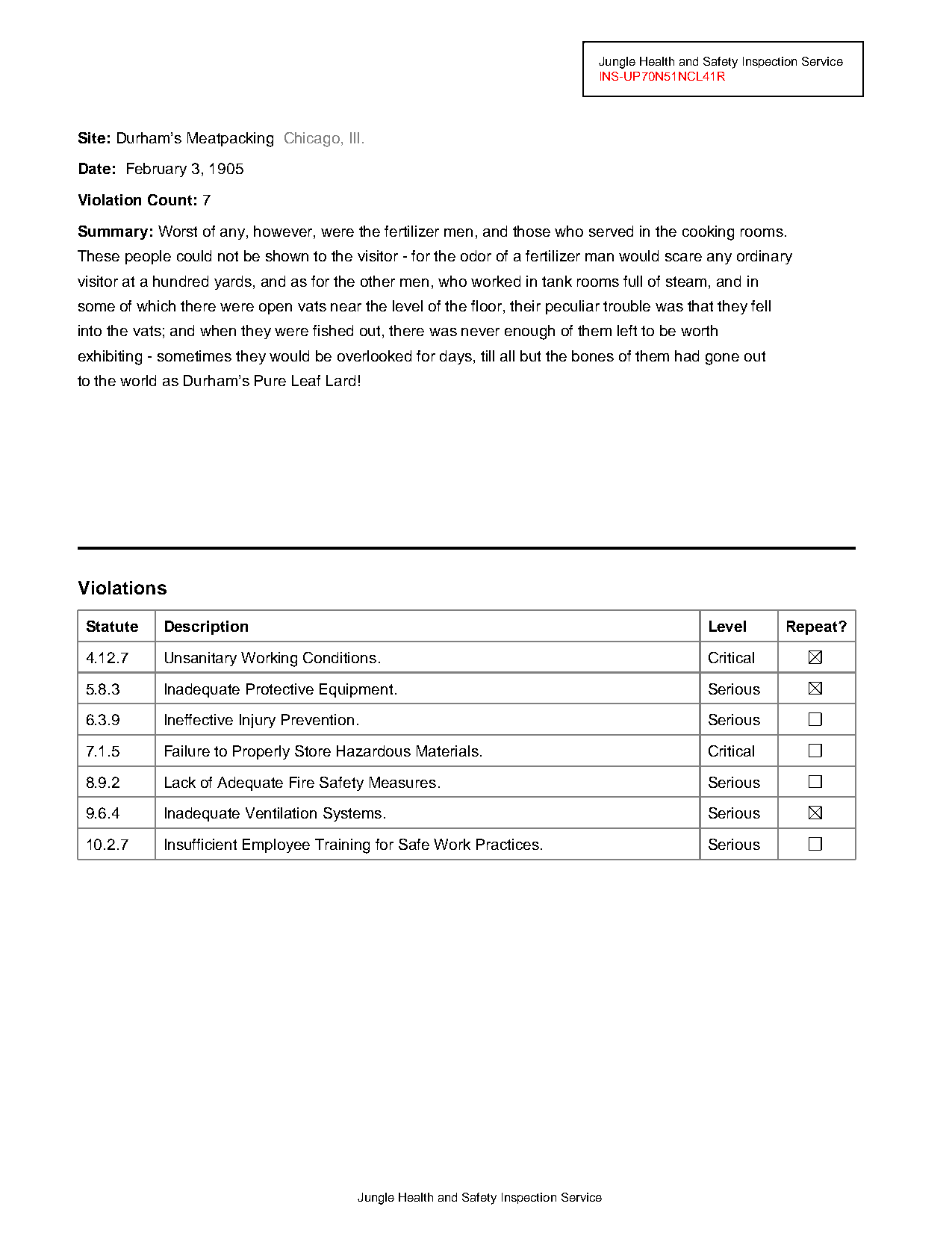
len(page.find_all('line'))21Fix, by what you saw:
- Lines exist but the output has junk rows/columns — a heading underline or section separator got swept into the grid. Build the grid explicitly with
Guides.from_lines(), remove the bad guide (guides.horizontal.remove_at(0)), thenguides.extract_table(). Every edit is visible viaguides.show(). - No lines at all — the evidence is alignment, not lines. Build verticals from the header words (
guides.vertical.from_headers(...)) and rows from content, or scope the extraction to a region anchored on the table’s heading so page furniture can’t leak in (worked example in Text and tables). - Rows silently missing — check
page.show(exclusions='red'). An exclusion overlapping the table thins it with no error. - Several tables on the page —
extract_table()returns one table. Usepage.extract_tables()(all of them) or scope to a region per table.
OCR text is garbled
Section titled “OCR text is garbled”Most likely cause: resolution too low for the engine, or the wrong engine for this document. Different engines fail differently on the same scan.
Fastest check: run the engines you have side by side and look:
cmp = page.compare_ocr(engines=["rapidocr", "doctr"])cmp.summary() # per-engine word counts, confidencecmp.show() # side-by-side rendercmp.diff() # where they disagreeFix:
- Raise the render resolution —
page.apply_ocr(resolution=300). Small text at low DPI is the classic garble source. - Switch engines — after comparing, keep the winner:
cmp.apply("doctr"). Engine trade-offs and install commands: Engines and Models. - Search through the garble instead of re-OCRing — the
:ocr()selector treats confusable characters (l/1/I,O/0) as near-matches:page.find('text:ocr("Invoice Total")'). - Measure it —
page.to_llm()includes a dictionary-based garble rate in its text-layer diagnostics when thequalityextra is installed (pip install "natural-pdf[quality]"), so you can flag bad text layers across a batch instead of eyeballing.
My exclusion didn’t work (or excluded too much)
Section titled “My exclusion didn’t work (or excluded too much)”Most likely cause: binding time. A selector string or element collection is resolved when you call add_exclusion() — the matched elements are stored then. A callable is stored as-is and re-evaluated at every read. If you registered a selector-string exclusion and then ran OCR (or anything that adds elements), the new elements were never matched — use a callable instead. The other classic: registering a page-shaped fix at the wrong level — page.add_exclusion(...) affects one page; pdf.add_exclusion(lambda page: ...) runs per page across the document.
Fastest check: render the zones — exclusion bugs are geometry bugs.
expdf = PDF("pdfs/01-practice.pdf")expage = expdf.pages[0]expage.add_exclusion(expage.region(top=0, left=0, height=80), label="letterhead")expage.show(exclusions='red')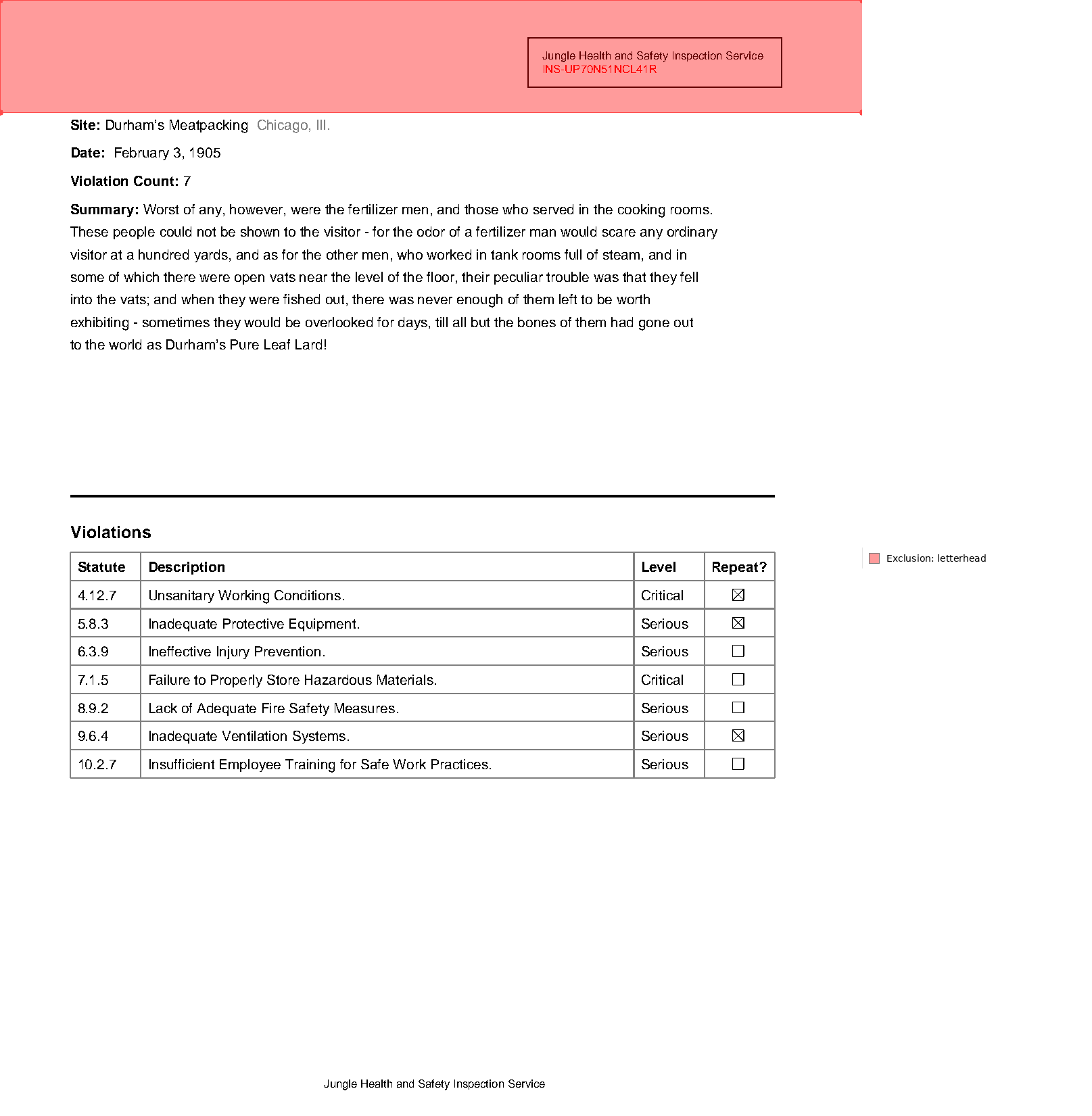
And read without the filter to see what’s hidden:
print(expage.extract_text()[:40])print(expage.extract_text(apply_exclusions=False)[:40])Site: Durham’s Meatpacking Chicago, Ill.
Jungle Health and Safety Inspection ServFix:
- Exclusion should track content that changes → pass a callable:
pdf.add_exclusion(lambda page: page.find('line[width>=2]').below()). - Exclusion eating your data (table rows vanishing, selectors “mysteriously” empty) → shrink the zone, or use
method="element"to drop only matched elements instead of a whole rectangle. - Remember it’s a read-time filter, not a deletion — every read accepts
apply_exclusions=False. Full model: Exclusions.
.below(width=200) raises TypeError
Section titled “.below(width=200) raises TypeError”Most likely cause: you meant the other parameter. In directional methods, the travel direction takes a number and the cross direction takes a mode string ('full' or 'element'). For .below(), the travel parameter is height=; width= only selects how wide the band is (full page vs. the anchor element’s width).
Fastest check: read the error — it names both parameters:
label = page.find('text:contains("Summary")')try: label.below(width=200)except TypeError as e: print(e)below() got width=200: width selects the cross-direction mode and must be 'full' or 'element'. Use height=<number> to control how far the region extends below; for a custom cross-size, use below(width='element').expand(...) or page.region(...).Fix: one of three, depending on what you meant:
label.below(height=200) # extend 200 pts downwardlabel.below(width='element').expand(right=50) # custom cross-sizepage.region(x0, top, x1, bottom) # you already know the coordinatesBefore 0.7, below(width=200) was silently treated like width='element' — a plausible-looking region with the wrong bounds. The loud TypeError is deliberate. Why the two defaults differ (.right() stays in the row, .below() spans the page): The Spatial Model.
Import or install errors
Section titled “Import or install errors”Most likely cause: the feature you called needs an optional dependency that isn’t in your environment — or is installed but broken.
Fastest check:
npdf doctorIt prints every dependency group with OK/MISS status, installed versions, and the exact pip install line for anything missing.
Fix, by error message:
Optional dependency '...' is not installed. Install with: ...— run the install command in the message. The feature-by-feature install matrix maps each method to its extra; the full dependency table is in Installation Extras.Optional dependency '...' is installed but failed to import: ...— this is not a missing package; reinstalling the same thing won’t help. The message includes the underlying import error (usually a conflicting transitive dependency, e.g. a numpy version clash). Fix the environment issue it names.ModuleNotFoundError: natural_pdf— wrong environment: comparepip show natural-pdfagainstsys.executable.
Memory grows in a batch loop
Section titled “Memory grows in a batch loop”Most likely cause: PDFs opened in a loop and never closed. Each open PDF holds its backing file and rendered/parsed state.
Fix: close every PDF when you’re done with it — PDF is a context manager, so the canonical loop is:
for path in pdf_paths: with PDF(path) as pdf: for page in pdf.pages: ... # extract what you need, keep only plain dataKeep results (strings, DataFrames, dicts) — not Page or Element objects — across iterations, since holding elements keeps their PDF alive.
Note close() is partial: lightweight state that was already materialized may still be readable afterward, but anything needing the live PDF backing (loading unseen pages, OCR, rendering) is unavailable once closed.
Text comes out in the wrong order
Section titled “Text comes out in the wrong order”Most likely cause: a multi-column page. extract_text() reads in visual top-to-bottom order across the full page width, which interleaves the columns:
mc = PDF("pdfs/multicolumn.pdf")mc_page = mc.pages[0]print(mc_page.extract_text()[:120])This is some text 25 8115 XXX21 6783
This is some text 26 8448 XXX22 7116
27 8781 XXX23 7449
This is some text 28 9114 XThose lines mix all three columns.
Fix: describe the columns as regions and stack them into a Flow — reads left column top to bottom, then the next:
from natural_pdf.flows import Flow
col_w = mc_page.width / 3cols = [mc_page.region(left=i * col_w, right=(i + 1) * col_w) for i in range(3)]
flow = Flow(segments=cols, arrangement="vertical")print(flow.extract_text()[:120])
This is some text
This is some text
This is some text
This is some text
This is some text
This is some text
This is someFlows support find() / find_all() and spatial navigation just like pages, so anchors and until= boundaries can cross column (and page) breaks. Worked examples: Page structure and Multi-column reflow.