Asking questions, getting data
So far you’ve pointed at things: selectors, spatial navigation, regions. This page is the other approach — describe the fields you want and let a model fill them in. The rule that keeps this honest: a model’s answer is a claim, not a fact, so every tool here comes with a way to check it against the page. We’re still on the inspection report.
from natural_pdf import PDF
pdf = PDF("pdfs/01-practice.pdf")page = pdf.pages[0]page.show()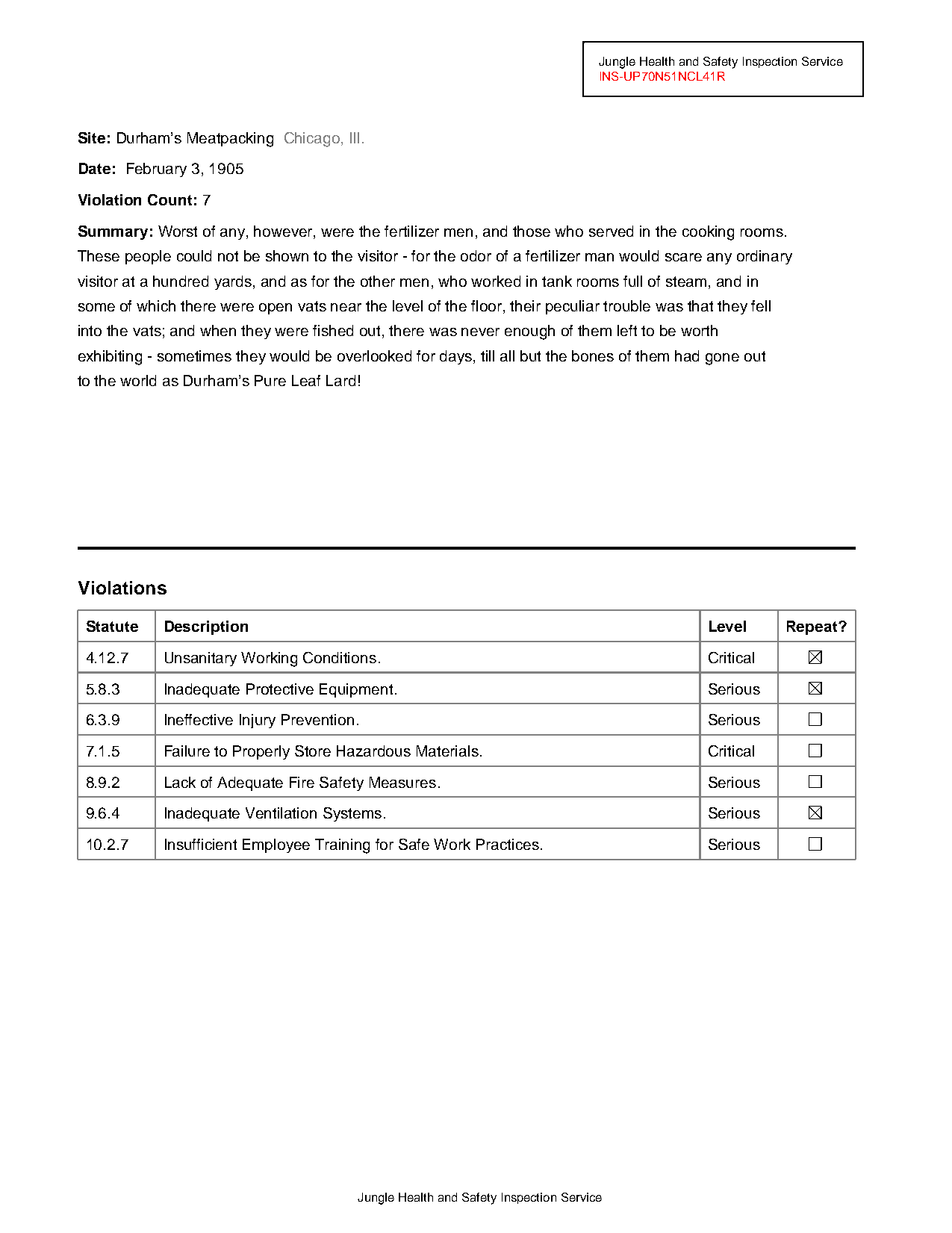
Ask a question, no API key required
Section titled “Ask a question, no API key required”page.ask() runs a local extractive QA model (LayoutLM) that reads the page’s text and layout, then points at the span that answers your question.
import loggingfrom transformers.utils.logging import disable_progress_bar
disable_progress_bar()logging.getLogger("pdfminer").setLevel(logging.ERROR)logging.getLogger("huggingface_hub.utils._http").addFilter(lambda r: r.levelno >= logging.ERROR)
page.ask("What is the violation count?")
StructuredDataResult(answer='7', answer_confidence=0.9999657869338989)The answer is '7', and the confidence is a real model probability — this is a purpose-trained QA model reporting how sure it is, not a chatbot being agreeable. Push on it with a few more questions, including one it can’t do:
questions = [ "When did the inspection happen?", "Who performed the inspection?", "What city is the site in?", "How many violations are Critical?",]for q in questions: r = page.ask(q) print(f"{r.answer_confidence:.3f} {q} -> {r.answer!r}")0.923 When did the inspection happen? -> 'February 3, 1905'
1.000 Who performed the inspection? -> 'Jungle Health and Safety Inspection Service'
0.537 What city is the site in? -> 'Durham’s Meatpacking Chicago, Ill.'
0.355 How many violations are Critical? -> '7.1.5'The first two are confident and right. The third is right-ish but the confidence sags — the model highlighted the whole line instead of just “Chicago”. The last one falls apart: two of the violations are Critical, but an extractive model can only quote spans that already exist on the page. It cannot count, add, or summarize, so it grabbed a statute number and priced its own answer at 0.35. That’s the model working as designed — low confidence here genuinely means “don’t trust this.”
When you need counting, synthesis, or judgment, you need a language model.
Structured extraction with an LLM
Section titled “Structured extraction with an LLM”page.extract() takes a list of field names and an OpenAI-compatible client — OpenAI, Google’s compatibility endpoint, OpenRouter, a local server, anything with the same API shape. The page’s text is sent to the model; you get back one value per field.
from openai import OpenAI
client = OpenAI(api_key=API_KEY)   # any OpenAI-compatible API
fields = ["site", "date", "violation count", "city", "full name of state"]results = page.extract(fields, client=client, model="gpt-4o-mini")results.to_dict()# illustrative — requires an API key; exact values depend on the model{'site': "Durham's Meatpacking", 'date': 'February 3, 1905', 'violation_count': '7', 'city': 'Chicago', 'full_name_of_state': 'Illinois'}Two things worth noticing. “full name of state” came back 'Illinois' even though the page only ever says Ill. — that’s the LLM’s value-add, and exactly the kind of nuance ask() couldn’t do. And every value is a string: list-of-names schemas are quick and loose. Field names get their spaces converted to underscores in the result keys.
Citations and confidence
Section titled “Citations and confidence”Ask the model to show its work. citations=True maps each value back to the elements on the page that support it; confidence=True asks the model to score each field:
results = page.extract( fields, client=client, model="gpt-4o-mini", citations=True, confidence=True,)results.to_dict()# illustrative{'site': "Durham's Meatpacking", 'site_confidence': 0.98, 'date': 'February 3, 1905', 'date_confidence': 0.99, 'violation_count': '7', 'violation_count_confidence': 0.95, ...}Treat these two features very differently. Citations are the good one: results.show() renders the page with each field’s source elements highlighted and labeled, results["site"].citations is a real ElementCollection you can inspect, and results.save_pdf("annotated.pdf") writes a PDF with highlight annotations — hand that to an editor and every number is one click from its source. Confidence is model-self-reported. Unlike the QA model’s probability above, an LLM’s 0.95 is just another generated token — the model making up a number about itself. It can be a useful relative signal for sorting which rows a human reviews first, and nothing more. Asking for it also makes the prompt more complex, which can itself hurt extraction accuracy — so don’t request it by default.
Schemas when it matters
Section titled “Schemas when it matters”For anything you’ll run across many documents, replace the string list with a Pydantic model: typed fields, descriptions that act as per-field instructions, and validation on the way out.
from pydantic import BaseModel, Field
class ReportInfo(BaseModel):    inspection_id: str = Field(description="The report identifier, starts with INS-")    site: str = Field(description="Name of the company inspected")    city: str    state: str = Field(description="Full state name, not the abbreviation")    inspection_date: str    violation_count: int
result = page.extract(ReportInfo, client=client, model="gpt-4o-mini")result.data# illustrativeReportInfo(inspection_id='INS-UP70N51NCL41R', site="Durham's Meatpacking", city='Chicago', state='Illinois', inspection_date='February 3, 1905', violation_count=7)violation_count is now an actual int. Access is the same either way: result.data.violation_count (the validated model), result["violation_count"].value (the field with its citations), or result.to_dict() (a plain dict). .ask() is literally this machinery with a one-field schema — everything on this page shares the same StructuredDataResult.
Where the model quietly lies
Section titled “Where the model quietly lies”Now the trap. Ask the LLM to extract the violations table, including the Repeat? checkboxes:
from typing import List, Literal
class ViolationRow(BaseModel):    statute: str    description: str    level: str    repeat: Literal["checked", "unchecked"]
class ViolationsTable(BaseModel):    violations: List[ViolationRow]
result = page.extract(ViolationsTable, client=client, model="gpt-4o-mini")[(v.statute, v.repeat) for v in result.data.violations]# illustrative — and WRONG about every checkbox[('4.12.7', 'unchecked'), ('5.8.3', 'unchecked'), ('6.3.9', 'unchecked'), ('7.1.5', 'unchecked'), ('8.9.2', 'unchecked'), ('9.6.4', 'unchecked'), ('10.2.7', 'unchecked')]Look at the page render at the top: three of those boxes are visibly checked. The model didn’t refuse, didn’t hedge — it confidently returned a complete, well-formed, wrong column, because text extraction sends the page’s text and the checkbox states aren’t in it. Nothing in the output warns you. This is the failure mode to design against: when the answer physically exists on the page — numbers, tables, checkboxes — extract it from the page (extract_table() from the first Learn page, detect_checkboxes() for the boxes) and save the LLM for what genuinely needs judgment. Verification isn’t a nice-to-have; it’s the workflow.
Which pile does this belong in?
Section titled “Which pile does this belong in?”A different job: not “what does this field say” but “what is this document.” classify() scores your labels against the document and stores the winner.
pdf.classify(['slaughterhouse report', 'dolphin training manual', 'basketball', 'birding'], using='text')(pdf.category, pdf.category_confidence)('slaughterhouse report', 0.8695712685585022)Zero-shot classification: no training, any labels you can name. The score is the classifier’s own — usable for setting a review threshold, unlike the LLM’s self-grade above.
Classifying page by page, by looks
Section titled “Classifying page by page, by looks”Classification earns its keep on messy documents. Here’s a 17-page CIA release investigating whether pigeons could be used for aerial photography — typed memos, cost tables, and flowcharts all stapled together:
cia = PDF("pdfs/cia-doc.pdf")cia.pages.show(columns=6, resolution=40)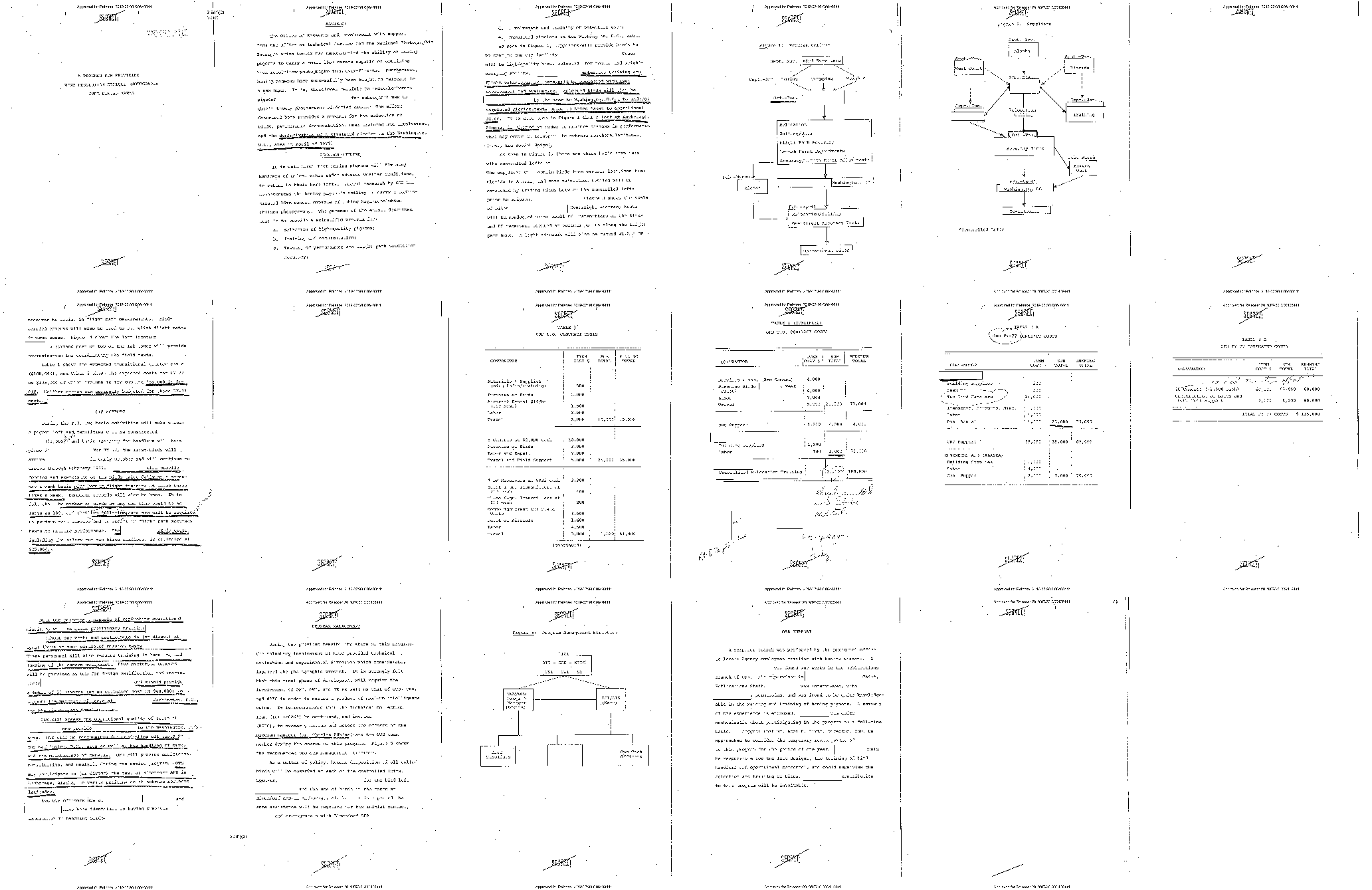
Suppose you only care about the flowcharts. The pages look different even where the text is mush, so classify each page by its rendered image instead of its text:
cia.classify_pages(['diagram', 'text', 'form', 'blank'], using='vision', progress_bar=False)for p in cia.pages: print(f"page {p.number:>2} {p.category:<8} {p.category_confidence:.3f}")page 1 text 0.813
page 2 text 0.950
page 3 text 0.947
page 4 diagram 0.927
page 5 diagram 0.942
page 6 text 0.678
page 7 text 0.968
page 8 text 0.559
page 9 text 0.824
page 10 text 0.496
page 11 text 0.459
page 12 text 0.559
page 13 text 0.959
page 14 text 0.935
page 15 diagram 0.979
page 16 text 0.947
page 17 text 0.701CLIP is quick and rough — fine for routing, not for verdicts. Keep the pages where it’s both confident and says what you want:
diagrams = cia.pages.filter(lambda p: p.category == 'diagram')diagrams.show(columns=3)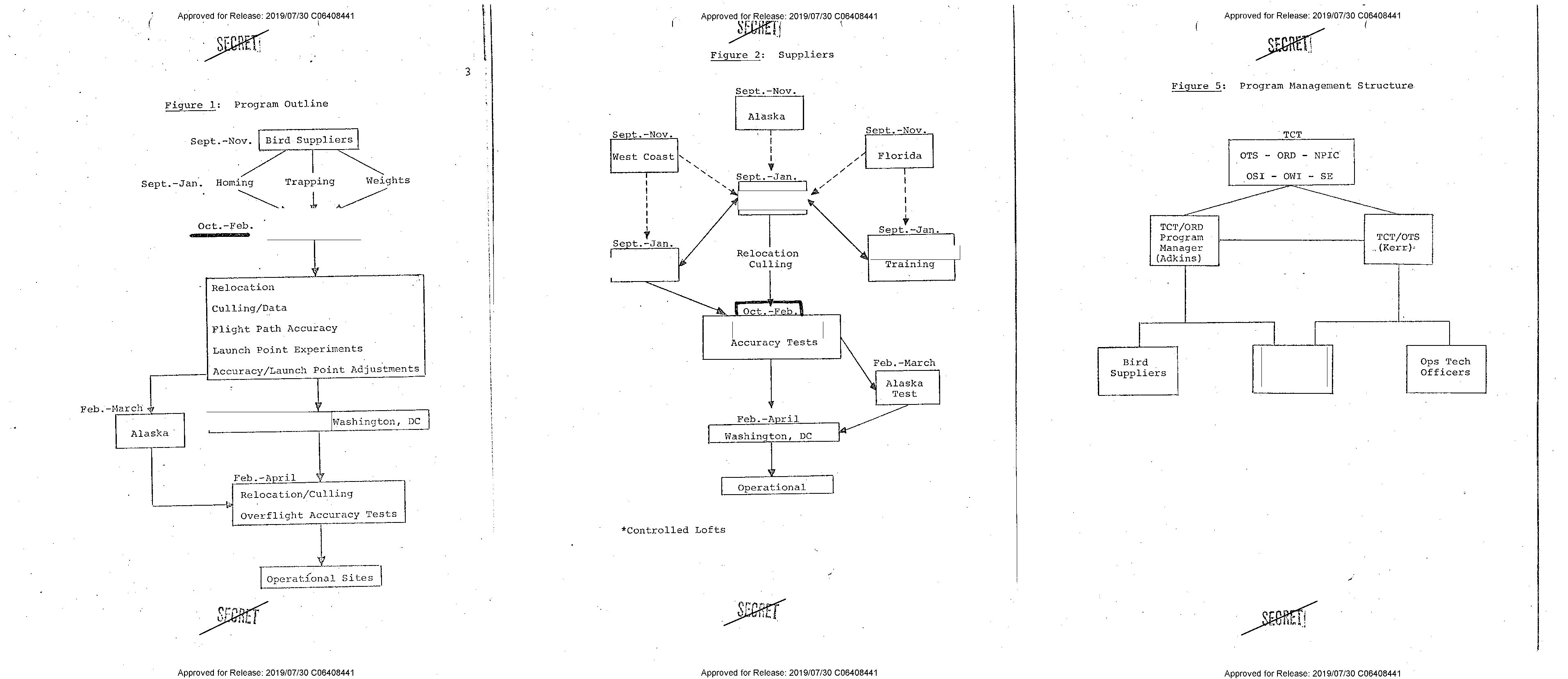
Three flowcharts, correctly fished out of seventeen pages. filter() takes any function of a page, so you can combine the category with a confidence floor (p.category == 'diagram' and p.category_confidence > 0.8) or anything else you can compute. And a filtered PageCollection can be written straight to a new, smaller PDF:
from pathlib import PathPath("temp").mkdir(exist_ok=True)
diagrams.save_pdf("temp/pigeon-diagrams.pdf", original=True)
original=True copies the actual pages — vectors, fonts, everything — rather than re-rendering them. That’s the triage loop for a big ugly release: classify pages, filter to the ones that matter, save the short PDF, read that.
What you can do now
Section titled “What you can do now”Ask a local model pointed questions and read its confidence like an instrument, send fields or a full Pydantic schema to any OpenAI-compatible LLM, demand citations so every value traces back to page elements, and classify whole documents or single pages by text or by looks. And you know the boundary line: models are for nuance and judgment — anything that’s literally ink on the page, extract with the page tools instead. The next page goes back to those tools for the hardest layouts: multi-column flows, and tables with no lines at all.