Putting it together
This is the capstone: one real document, no models, and every move comes from the earlier pages. The document is Atlanta Public Schools’ library weeding log — the running record of every book pulled from a school shelf, with the title, school, barcode, and dates. Look at the fine print at the bottom of the page: this sample is 5 pages of a report whose footer says Total pages: 23,133. Nobody reads that by hand. The goal is a DataFrame: one row per removed book.
from natural_pdf import PDF
pdf = PDF("pdfs/Atlanta_Public_Schools_GA_sample.pdf")page = pdf.pages[0]page.show()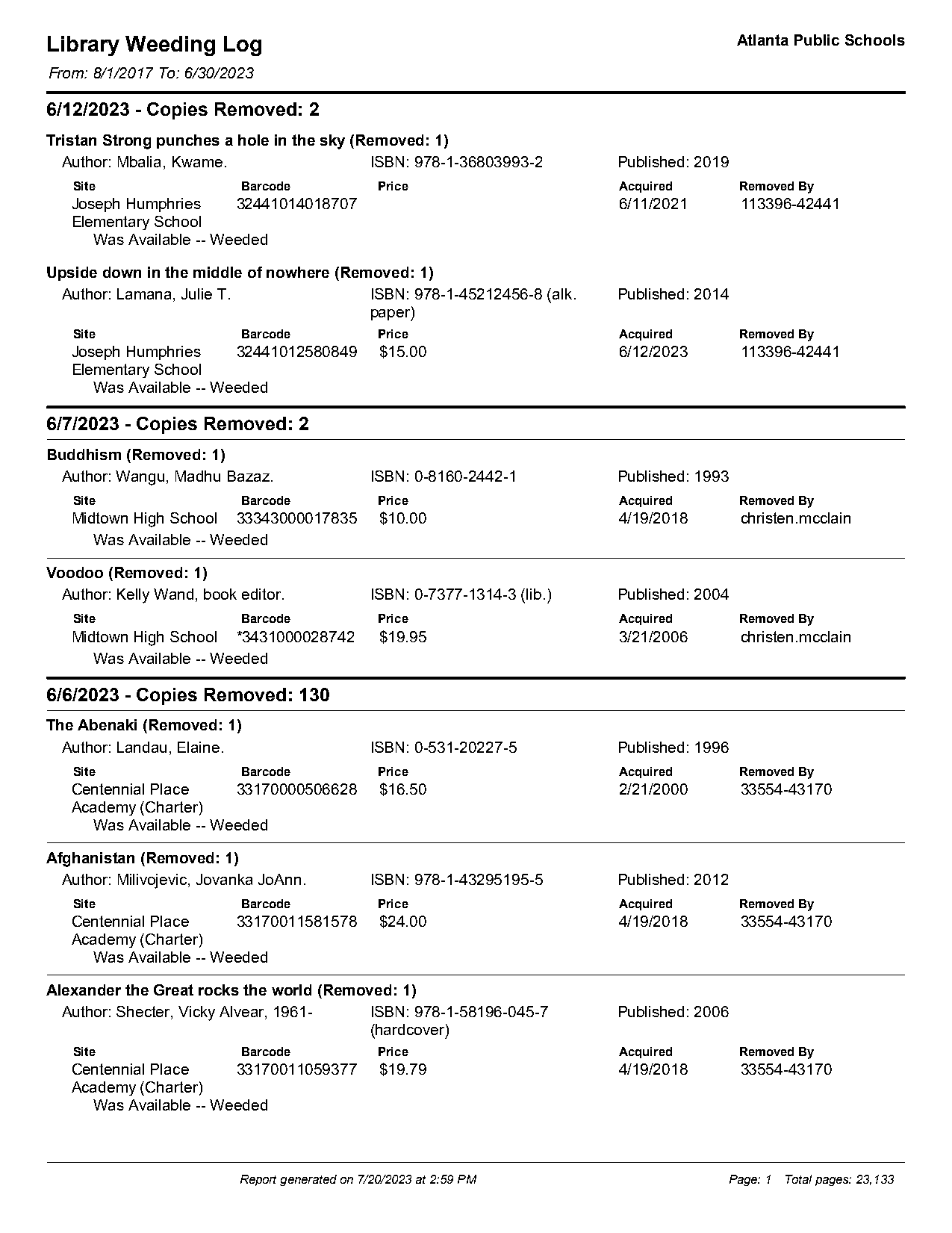
The layout, from the top: a letterhead, then date headers (“6/12/2023 - Copies Removed: 2”), and under each date a stack of book records — bold title line, an Author/ISBN/Published line, then a little Site/Barcode/Price/Acquired/Removed-By block.
Clear the furniture first
Section titled “Clear the furniture first”The letterhead repeats on every page, and so does a footer (“Report generated on…”) — pure noise for extraction, and worse than noise: the last record on each page runs to the bottom of the page, so the footer would end up inside it. Register both zones on the PDF, as functions — every page evaluates them for itself, exactly like the end of the first Learn page:
pdf.add_exclusion(lambda page: page.find('line[width>=2]').above())pdf.add_exclusion(lambda page: page.find_all('line')[-1].below())page.show(exclusions='red')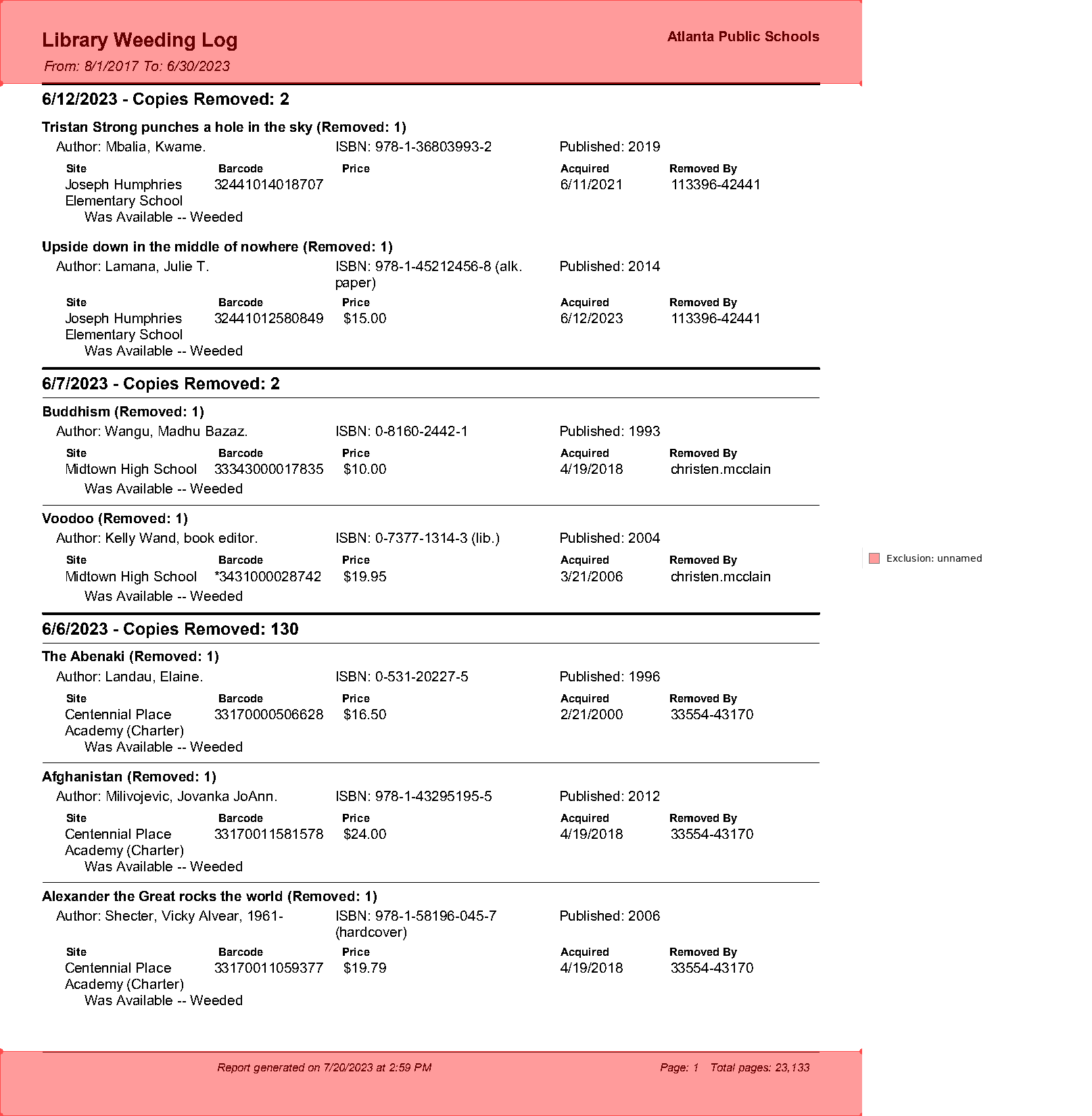
Everything above the thick rule and below the last horizontal line is now invisible to every extraction that follows, on every page.
Find the spine of the document
Section titled “Find the spine of the document”Each record starts with a bold title. What selector isolates them? Ask the page:
page.find_all('text').inspect(limit=8)Collection Inspection (114 elements)
Word Elements
| text | x0 | top | x1 | bottom | font_family | font_variant | size | styles | source | confidence | color |
|---|---|---|---|---|---|---|---|---|---|---|---|
| 6/12/2023 - Copies Removed: 2 | 30 | 65 | 205 | 77 | font000000002a8d158a | AAAAAB | 12 | native | 1.00 | #000000 | |
| Tristan Strong punches a hole in the sky (Removed:... | 30 | 86 | 289 | 96 | font000000002a8d158a | AAAAAB | 10 | native | 1.00 | #000000 | |
| Author: Mbalia, Kwame. | 40 | 100 | 146 | 110 | font000000002a8d158a | AAAAAD | 10 | native | 1.00 | #000000 | |
| ISBN: 978-1-36803993-2 | 238 | 100 | 349 | 110 | font000000002a8d158a | AAAAAD | 10 | native | 1.00 | #000000 | |
| Published: 2019 | 397 | 100 | 469 | 110 | font000000002a8d158a | AAAAAD | 10 | native | 1.00 | #000000 | |
| Site | 47 | 116 | 62 | 124 | font000000002a8d158a | AAAAAB | 8 | native | 1.00 | #000000 | |
| Barcode | 155 | 116 | 187 | 124 | font000000002a8d158a | AAAAAB | 8 | highlight(#ffffff) | native | 1.00 | #000000 |
| Price | 243 | 116 | 263 | 124 | font000000002a8d158a | AAAAAB | 8 | highlight(#ffffff) | native | 1.00 | #000000 |
| Showing 8 of 114 elements (pass a higher limit to see more) |
Read the columns: the date header is 12 pt, titles are 10 pt, but the Author/ISBN lines are also 10 pt. Size alone won’t cut it. The tell is font_variant — titles and labels are variant AAAAAB (the bold face), field text is AAAAAD. Titles are the only 10 pt text in the bold variant:
(len(page.find_all('text[size=10]')), len(page.find_all('text[font_variant=AAAAAB][size=10]')))(76, 7)76 candidates by size, 7 by size plus variant — and this page visibly has 7 books. font_variant codes are meaningless strings (subset font tags), but they’re consistent within a document, which is all a selector needs:
TITLE = 'text[font_variant=AAAAAB][size=10]'
titles = page.find_all(TITLE)titles.show()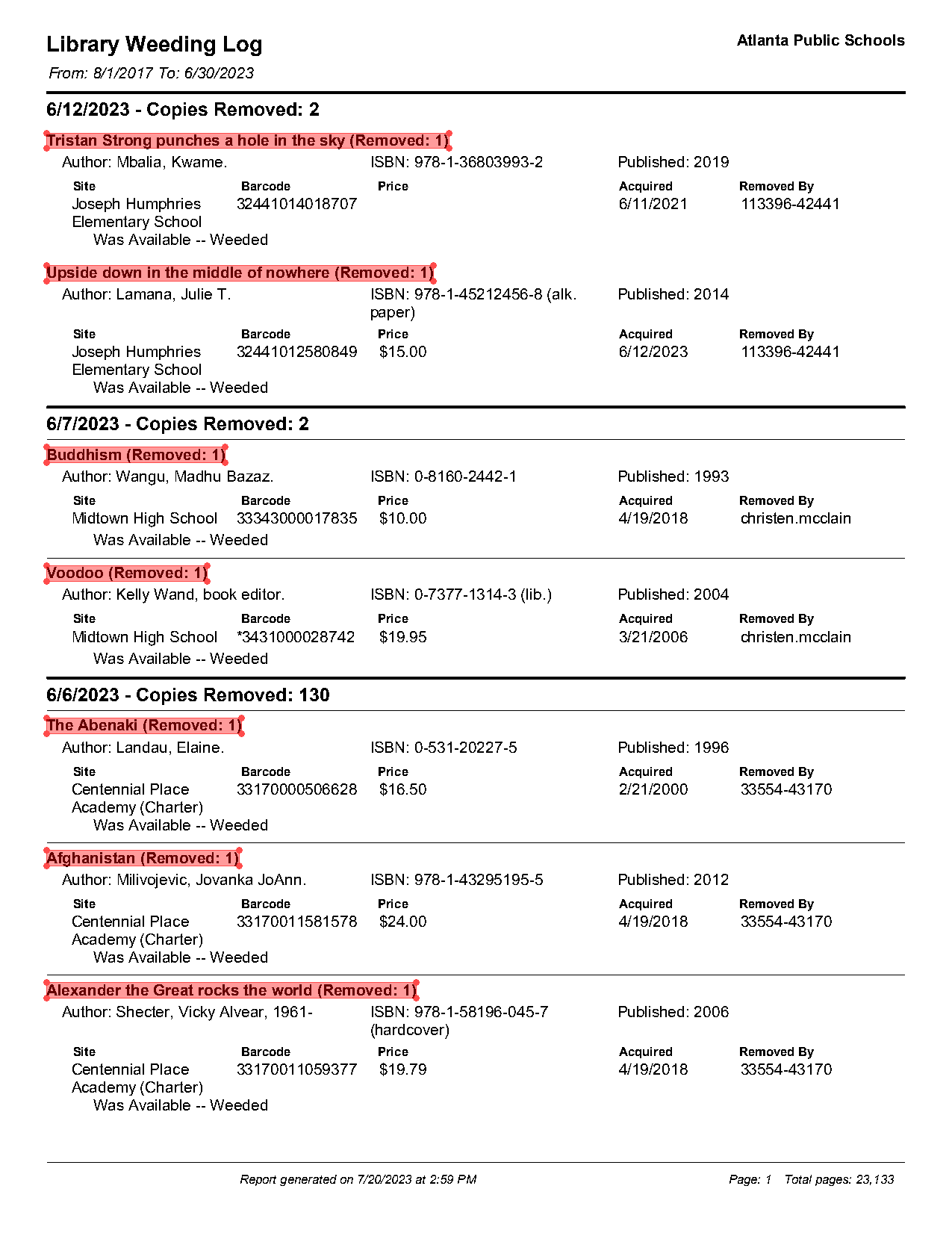
One region per record
Section titled “One region per record”Each record is “everything from its title down to the next title.” That’s .below(until=...) — applied to the whole collection at once, producing one region per title. include_source=True keeps the title line inside its own region:
books = titles.below(until=TITLE, include_endpoint=False, include_source=True)books.show()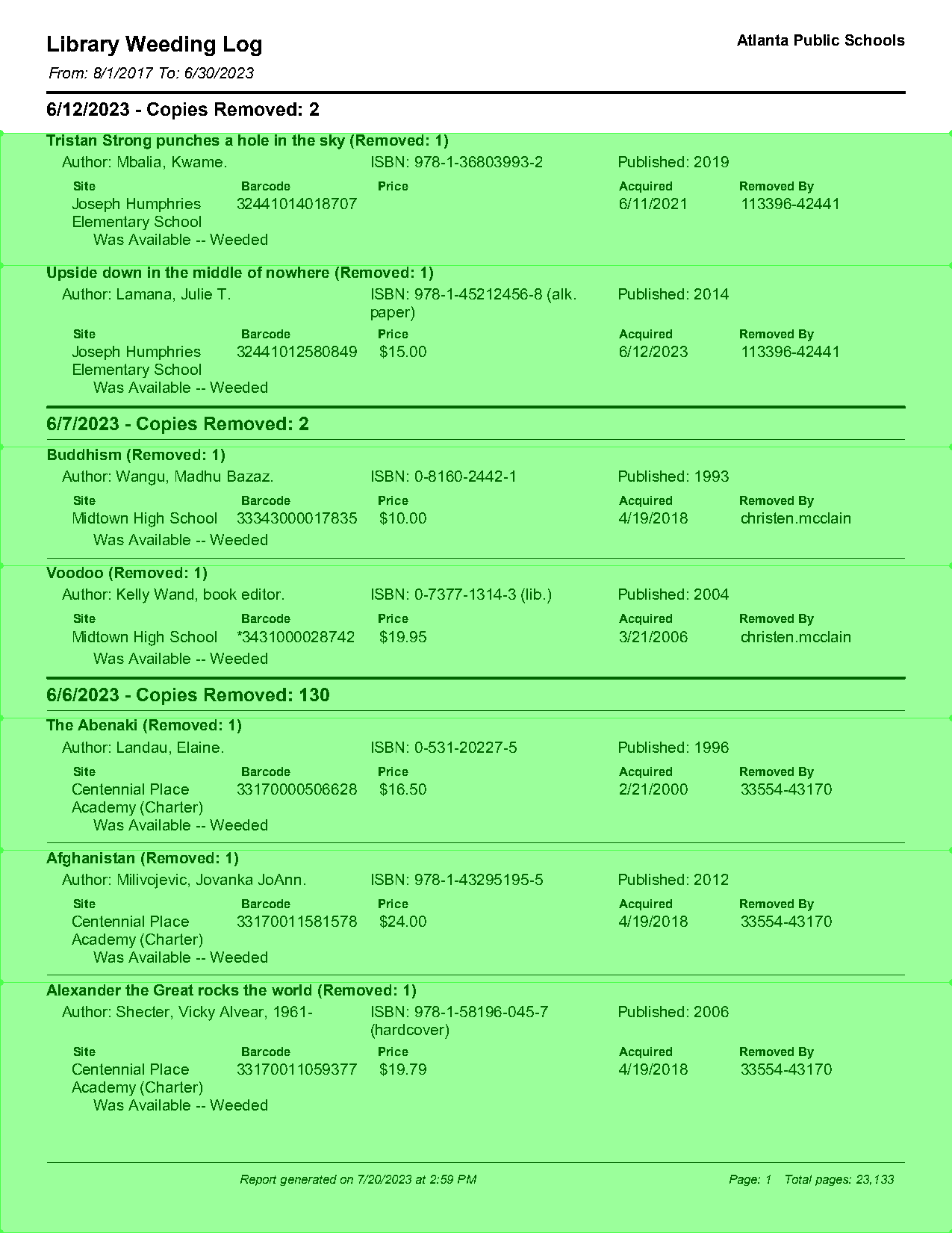
Seven bands, one per book. This is the segmentation that makes everything else easy: any find on books runs once per region and gives back one result per record, in order.
Harvest the fields
Section titled “Harvest the fields”Whole-line fields. The author line is inside each record and starts with “Author:” — find on the collection returns one element per record:
books.find('text:contains("Author")').extract_each_text()['Author: Mbalia, Kwame.',
'Author: Lamana, Julie T.',
'Author: Wangu, Madhu Bazaz.',
'Author: Kelly Wand, book editor.',
'Author: Landau, Elaine.',
'Author: Milivojevic, Jovanka JoAnn.',
'Author: Shecter, Vicky Alvear, 1961-']The school name — and a trap. The site value sits below the “Site” label. Try the obvious move and look closely at the first result:
naive = ( books .find('text:contains("Site")') .below() .apply(lambda region: region.find_all('text[x0<47][size=10]').extract_text()))naive[0][:120]'Joseph Humphries Elementary School Upside down in the middle of nowhere (Removed: 1) Author: Lamana, Julie T. Joseph Hum'The first “school name” contains every school and title on the rest of the page. .below() doesn’t know where the record ends — it ran to the bottom of the page, straight through the next six records. .clip(books) cuts each region back to its own record’s band:
sites = ( books .find('text:contains("Site")') .below() .clip(books) .apply(lambda region: region.find_all('text[x0<47][size=10]').extract_text()))sites['Joseph Humphries Elementary School',
'Joseph Humphries Elementary School',
'Midtown High School',
'Midtown High School',
'Centennial Place Academy (Charter)',
'Centennial Place Academy (Charter)',
'Centennial Place Academy (Charter)'](The x0<47 filter is from inspect() too: within the site block, the school name is the only 10 pt text starting left of the “Site” label, which sits at x0=47. School names wrap to two lines, which is why this one is an apply + extract_text() — it folds the wrapped lines into one string.)
Column values under a label. Barcode values sit directly under the “Barcode” label but stick out wider than it. Take a thin region below each label and widen it:
barcodes = ( books .find('text:contains("Barcode")') .below(width='element', height=12) .expand(left=10, right=50) .extract_each_text())barcodes['32441014018707',
'32441012580849',
'33343000017835',
'*3431000028742',
'33170000506628',
'33170011581578',
'33170011059377']Without the expand, the first digit falls outside the label’s width and every barcode comes back one digit short — off-by-a-few-points errors like that are exactly why you spot-check extracted values against the page image.
Looking up instead of down. Which date batch does each book belong to? The date header is above the record — possibly far above, with other records in between. .above(until=...) climbs from each record to the first 12 pt-or-larger text, and .endpoints collects the elements it stopped at:
dates = books.above(until='text[size>10]').endpointsdates.show()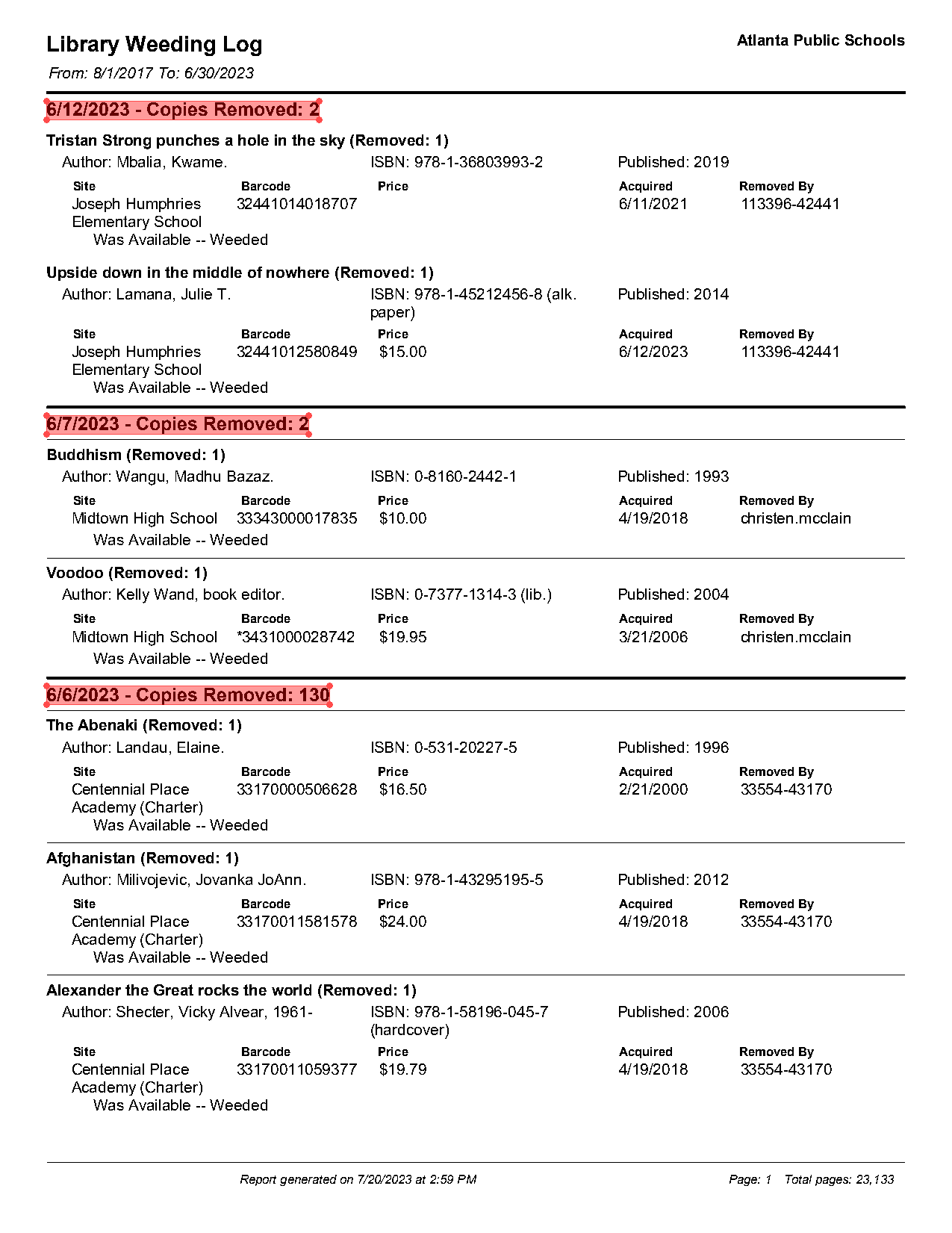
dates.extract_each_text()['6/12/2023 - Copies Removed: 2',
'6/12/2023 - Copies Removed: 2',
'6/7/2023 - Copies Removed: 2',
'6/7/2023 - Copies Removed: 2',
'6/6/2023 - Copies Removed: 130',
'6/6/2023 - Copies Removed: 130',
'6/6/2023 - Copies Removed: 130']Three date headers on the page, and each of the seven records found its own — records 1–2 map to 6/12, 3–4 to 6/7, the rest to 6/6.
The DataFrame
Section titled “The DataFrame”Every column is one chained expression. Line them up:
import pandas as pd
df = pd.DataFrame({ 'title': titles.extract_each_text(), 'author': books.find('text:contains("Author")').extract_each_text(), 'site': sites, 'barcode': barcodes, 'removed': dates.extract_each_text(),})df| title | author | site | barcode | removed | |
|---|---|---|---|---|---|
| 0 | Tristan Strong punches a hole in the sky (Remo... | Author: Mbalia, Kwame. | Joseph Humphries Elementary School | 32441014018707 | 6/12/2023 - Copies Removed: 2 |
| 1 | Upside down in the middle of nowhere (Removed: 1) | Author: Lamana, Julie T. | Joseph Humphries Elementary School | 32441012580849 | 6/12/2023 - Copies Removed: 2 |
| 2 | Buddhism (Removed: 1) | Author: Wangu, Madhu Bazaz. | Midtown High School | 33343000017835 | 6/7/2023 - Copies Removed: 2 |
| 3 | Voodoo (Removed: 1) | Author: Kelly Wand, book editor. | Midtown High School | *3431000028742 | 6/7/2023 - Copies Removed: 2 |
| 4 | The Abenaki (Removed: 1) | Author: Landau, Elaine. | Centennial Place Academy (Charter) | 33170000506628 | 6/6/2023 - Copies Removed: 130 |
| 5 | Afghanistan (Removed: 1) | Author: Milivojevic, Jovanka JoAnn. | Centennial Place Academy (Charter) | 33170011581578 | 6/6/2023 - Copies Removed: 130 |
| 6 | Alexander the Great rocks the world (Removed: 1) | Author: Shecter, Vicky Alvear, 1961- | Centennial Place Academy (Charter) | 33170011059377 | 6/6/2023 - Copies Removed: 130 |
One row per book, straight from selectors and spatial navigation. From here it’s ordinary pandas, so ordinary cleanup applies — strip the label prefixes and the “(Removed: 1)” suffixes, and split the batch date off its header:
df['title'] = df['title'].str.replace(r'\s*\(Removed: \d+\)$', '', regex=True)df['author'] = df['author'].str.replace('Author: ', '', regex=False)df['removed_on'] = df['removed'].str.split(' - ').str[0]df.drop(columns='removed')| title | author | site | barcode | removed_on | |
|---|---|---|---|---|---|
| 0 | Tristan Strong punches a hole in the sky | Mbalia, Kwame. | Joseph Humphries Elementary School | 32441014018707 | 6/12/2023 |
| 1 | Upside down in the middle of nowhere | Lamana, Julie T. | Joseph Humphries Elementary School | 32441012580849 | 6/12/2023 |
| 2 | Buddhism | Wangu, Madhu Bazaz. | Midtown High School | 33343000017835 | 6/7/2023 |
| 3 | Voodoo | Kelly Wand, book editor. | Midtown High School | *3431000028742 | 6/7/2023 |
| 4 | The Abenaki | Landau, Elaine. | Centennial Place Academy (Charter) | 33170000506628 | 6/6/2023 |
| 5 | Afghanistan | Milivojevic, Jovanka JoAnn. | Centennial Place Academy (Charter) | 33170011581578 | 6/6/2023 |
| 6 | Alexander the Great rocks the world | Shecter, Vicky Alvear, 1961- | Centennial Place Academy (Charter) | 33170011059377 | 6/6/2023 |
All five pages
Section titled “All five pages”Nothing above referenced page 1 specifically — the selectors describe any page of this report. Wrap the recipe in a function and concatenate:
def records_from(page):    titles = page.find_all(TITLE)    if not titles:        return None    books = titles.below(until=TITLE, include_endpoint=False, include_source=True)    return pd.DataFrame({        'title': titles.extract_each_text(),        'author': books.find('text:contains("Author")').extract_each_text(),        'site': (books.find('text:contains("Site")').below().clip(books)                 .apply(lambda r: r.find_all('text[x0<47][size=10]').extract_text())),        'barcode': (books.find('text:contains("Barcode")')                    .below(width='element', height=12).expand(left=10, right=50)                    .extract_each_text()),        'removed': books.above(until='text[size>10]').endpoints.extract_each_text(),    })
frames = [records_from(p) for p in pdf.pages]all_books = pd.concat([f for f in frames if f is not None], ignore_index=True)len(all_books)37all_books['site'].value_counts()site
Centennial Place Academy (Charter) 29
Joseph Humphries Elementary School 4
Midtown High School 2
2
Name: count, dtype: int6437 books across 5 pages, and the site counts give the story its first shape — which schools were shedding books that week. Notice the blank entry with a count of 2: two records came back with no site at all. Before blaming the code, check the page — and in fact those two records (one on page 2, one on page 4) genuinely have no Site block in the PDF. Missing on the page became empty in the DataFrame, which is the behavior you want; an extraction that quietly invented a school would be far worse. This check — every oddity in the output traced back to the page image — is the habit that makes extraction trustworthy.
The batch loop
Section titled “The batch loop”The real version of this project is many PDFs — the next FOIA batch, the next district, the next year. The pattern: open, register exclusions, extract, close. close() releases the file handle; skip it in a loop over two hundred PDFs and you’ll find out why it matters:
sources = {    'atlanta': "pdfs/Atlanta_Public_Schools_GA_sample.pdf",    # next district's log goes here}
collected = []for district, path in sources.items():    pdf = PDF(path)    try:        pdf.add_exclusion(lambda page: page.find('line[width>=2]').above())        pdf.add_exclusion(lambda page: page.find_all('line')[-1].below())        frames = [records_from(p) for p in pdf.pages]        district_df = pd.concat([f for f in frames if f is not None], ignore_index=True)        district_df['district'] = district        collected.append(district_df)    finally:        pdf.close()
combined = pd.concat(collected, ignore_index=True)combined['district'].value_counts()
district
atlanta 37
Name: count, dtype: int64try/finally guarantees the close even when one malformed PDF throws halfway through — and in a two-hundred-file batch, one always does. From here, combined.to_csv("weeded_books.csv") and you’re in spreadsheet land.
Where to go from here
Section titled “Where to go from here”You’ve now seen the whole toolkit run end to end: selectors and inspect() to find anchors, spatial navigation to turn anchors into fields, exclusions to silence page furniture, collections to do it per-record, and pandas to finish the job. Two directions from here:
- Solve — the task-oriented section of these docs: short recipes for specific jobs (redactions, checkboxes, multi-page tables, searchable PDFs) that assume you know everything this track just covered.
- Reference — the lookup pages: every selector and pseudo-class, engines and their trade-offs, install extras, and OCR options.
And when a document fights back — garbled text, no text, tables that won’t line up — you now know which page of this track to reread.