Quickstart
In 15 minutes: open an inspection report, pull one labeled value off it, extract its violations table as a DataFrame, then scale the whole thing to a folder of filings.
Install the base package (no OCR or models needed for this page):
pip install natural-pdfThis page uses 01-practice.pdf, a one-page fake inspection report from the Natural PDF repo. Download it into a pdfs/ folder next to your script — or pass that URL straight to PDF(...), which works too.
Open a PDF and look at it
Section titled “Open a PDF and look at it”from natural_pdf import PDF
pdf = PDF("pdfs/01-practice.pdf") # a URL or bytes also workpage = pdf.pages[0]page.show(width=700)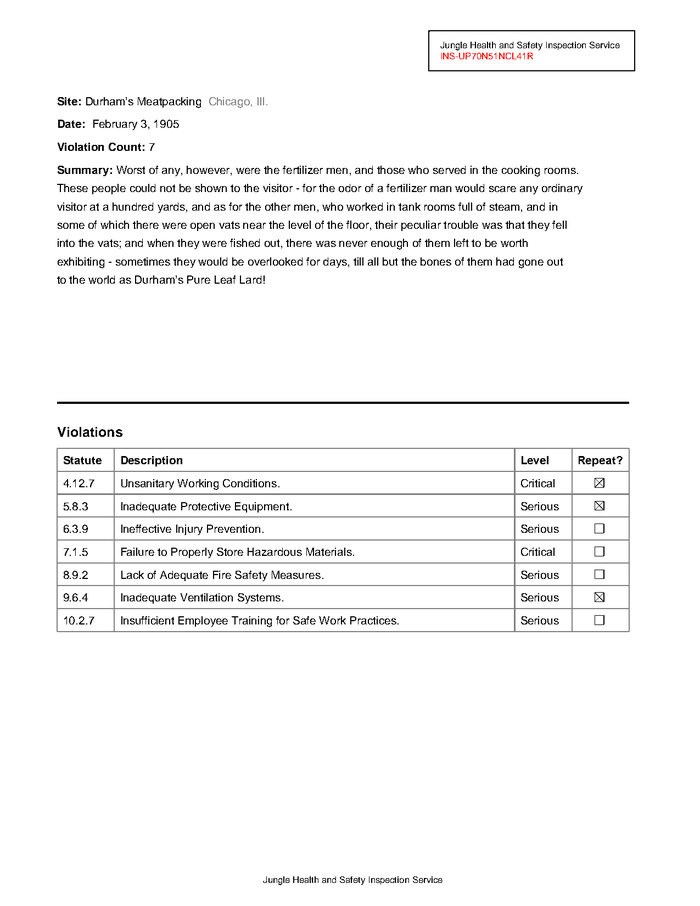
pdf.pages is a page collection you can index and slice; page.show() renders the page as a PIL image. In a notebook it displays inline; in a script, save it instead: page.show(width=700).save("page.png").
If PDF(...) raises FileNotFoundError, the path is relative to wherever Python is running — check with import os; os.getcwd().
Grab all the text
Section titled “Grab all the text”text = page.extract_text()print(text[:190])Jungle Health and Safety Inspection Service
INS-UP70N51NCL41R
Site: Durham’s Meatpacking Chicago, Ill.
Date: February 3, 1905
Violation Count: 7
Summary: Worst of any, however, were the fertextract_text() always returns a str. If it comes back empty, your PDF is probably a scan with no text layer — that’s an OCR job: see scanned documents and the install page for pip install "natural-pdf[all]".
Find things with selectors
Section titled “Find things with selectors”Instead of looping over words and checking coordinates, describe what you want:
label = page.find('text:contains("Violation Count")')label<TextElement text='Violation ...' font='Helvetica' size=10.0, style=['bold'] bbox=(50.0, 124.07000000000005, 129.99999999999997, 134.07000000000005)>find() returns the first matching element, or None when nothing matches — check before calling methods on the result. Look at what you found by cropping in around it:
label.show(crop=50)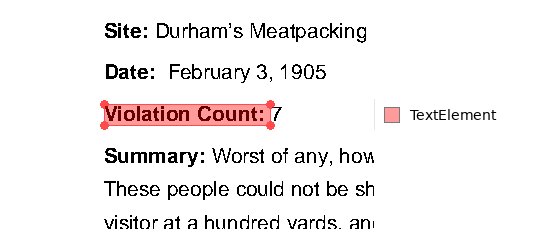
find_all() returns every match as a collection:
page.find_all('text:bold')<ElementCollection[TextElement](count=9)>Selectors combine a type (text, line, rect), pseudo-classes with a colon (text:bold, text:contains("Total")), and attribute filters in brackets (text[size>=10], text:bold[size>=14]).
Read the value next to a label
Section titled “Read the value next to a label”Government forms are full of Label: value pairs. Grab the region to the right of the label — same row, out to the page edge:
value = label.right()value.show(crop=30)
value.extract_text()'7'Directional methods return Regions: .right() and .left() stay on the element’s row by default, .below() and .above() span the full page width by default. Pass a number for extent — label.below(height=50) is the 50 points below the label. (The cross-direction keyword is a mode string: width='full' or width='element' on .below()/.above(), not a number.)
Extract the table
Section titled “Extract the table”page.extract_table().to_df()| Statute | Description | Level | Repeat? | |
|---|---|---|---|---|
| 0 | 4.12.7 | Unsanitary Working Conditions. | Critical | <NA> |
| 1 | 5.8.3 | Inadequate Protective Equipment. | Serious | <NA> |
| 2 | 6.3.9 | Ineffective Injury Prevention. | Serious | <NA> |
| 3 | 7.1.5 | Failure to Properly Store Hazardous Materials. | Critical | <NA> |
| 4 | 8.9.2 | Lack of Adequate Fire Safety Measures. | Serious | <NA> |
| 5 | 9.6.4 | Inadequate Ventilation Systems. | Serious | <NA> |
| 6 | 10.2.7 | Insufficient Employee Training for Safe Work P... | Serious | <NA> |
extract_table() returns a TableResult; .to_df() hands you a pandas DataFrame with the first row as the header. If the result is empty or scrambled, the table probably has no ruling lines or is a scan — see tables for the guided and OCR-backed approaches.
Scale it to a stack of filings
Section titled “Scale it to a stack of filings”The pattern for a folder of PDFs: open, extract, close, collect rows. Closing matters — each open PDF holds a file handle.
import pandas as pd
def value_after(page, label):    el = page.find(f'text:contains("{label}")')    return el.right().extract_text() if el else None
paths = ["pdfs/01-practice.pdf"]  # in real life: sorted(glob.glob("filings/*.pdf"))
rows = []for path in paths:    pdf = PDF(path)    try:        page = pdf.pages[0]        rows.append({            "file": path,            "site": value_after(page, "Site:"),            "date": value_after(page, "Date:"),            "violations": value_after(page, "Violation Count"),        })    finally:        pdf.close()
pd.DataFrame(rows)| file | site | date | violations | |
|---|---|---|---|---|
| 0 | pdfs/01-practice.pdf | Durham’s Meatpacking Chicago, Ill. | February 3, 1905 | 7 |
The value_after helper returns None instead of crashing when a filing is missing a label — so one malformed document doesn’t kill a 500-file run, and the blank cell tells you which file to inspect.
Where to go next
Section titled “Where to go next”- Learn — tutorials that build up each skill: selectors, regions, tables, OCR.
- Concepts — how Natural PDF thinks: elements, regions, exclusions as read-time filters.
- Solve — recipes for specific problems: scanned documents, borderless tables, headers and footers, multi-column layouts.
- Coming from pdfplumber — if you already have pdfplumber code, a task-by-task translation.