Coming from pdfplumber
Natural PDF is built on pdfplumber: same parsing, same coordinate system (x0/top/x1/bottom in points, origin at the top-left). If you have working pdfplumber code, your mental model transfers — this page maps each common task to its Natural PDF form. Both columns below actually run against the same file, so you can compare outputs directly.
pip install natural-pdfpdfplumber comes with it — you don’t need a separate install to run the left-hand column.
Open a PDF and get a page
Section titled “Open a PDF and get a page”pdfplumber
import pdfplumber
plumber_pdf = pdfplumber.open("pdfs/01-practice.pdf")plumber_page = plumber_pdf.pages[0]plumber_page.page_number1Natural PDF
from natural_pdf import PDF
pdf = PDF("pdfs/01-practice.pdf") # also accepts a URL or bytespage = pdf.pages[0]page.number1Both need closing when you’re done (.close(), or a with block — both libraries support it). We close at the end of this page.
Extract text
Section titled “Extract text”pdfplumber
plumber_page.extract_text()[:190]'Jungle Health and Safety Inspection Service\nINS-UP70N51NCL41R\nSite: Durham’s Meatpacking Chicago, Ill.\nDate: February 3, 1905\nViolation Count: 7\nSummary: Worst of any, however, were the fert'Natural PDF
page.extract_text()[:190]'Jungle Health and Safety Inspection Service\nINS-UP70N51NCL41R\nSite: Durham’s Meatpacking Chicago, Ill.\nDate: February 3, 1905\nViolation Count: 7\nSummary: Worst of any, however, were the fert'Same method name, near-identical output on a digital PDF. Two differences: Natural PDF’s extract_text() always returns str (never None), and it respects exclusion zones if you’ve defined any.
Words vs. elements
Section titled “Words vs. elements”In pdfplumber you get dicts and filter them with comprehensions. In Natural PDF you get element objects and filter them with selectors.
pdfplumber
words = plumber_page.extract_words(extra_attrs=["size"])words[0]{'text': 'Jungle',
'x0': 385.0,
'x1': 408.568,
'top': 35.65599999999995,
'doctop': 35.65599999999995,
'bottom': 43.65599999999995,
'upright': True,
'height': 8.0,
'width': 23.567999999999984,
'direction': 'ltr',
'size': 8.0}len([w for w in words if w["size"] >= 10])187Natural PDF
elements = page.find_all('text')elements[0]<TextElement text='Jungle Hea...' font='Helvetica' size=8.0 bbox=(385.0, 35.65599999999995, 541.9680000000001, 43.65599999999995)>len(page.find_all('text[size>=10]'))41The counts differ on purpose: extract_words() splits on whitespace, while Natural PDF’s text elements are contiguous same-style runs on a line ("Jungle Health and Safety Inspection Service" is one element, not six). Each element still has .text, .x0, .top, .x1, .bottom, .size, and .fontname; for character-level work, page.chars is there too. Selectors also reach things comprehensions can’t see as easily — 'text:bold', 'text:contains("Date")', 'text[size>=10]' — and combine: 'text:bold[size>=10]'.
Extract a table
Section titled “Extract a table”pdfplumber
plumber_page.extract_table()[:3][['Statute', 'Description', 'Level', 'Repeat?'],
['4.12.7', 'Unsanitary Working Conditions.', 'Critical', ''],
['5.8.3', 'Inadequate Protective Equipment.', 'Serious', '']]Natural PDF
page.extract_table().to_df()| Statute | Description | Level | Repeat? | |
|---|---|---|---|---|
| 0 | 4.12.7 | Unsanitary Working Conditions. | Critical | <NA> |
| 1 | 5.8.3 | Inadequate Protective Equipment. | Serious | <NA> |
| 2 | 6.3.9 | Ineffective Injury Prevention. | Serious | <NA> |
| 3 | 7.1.5 | Failure to Properly Store Hazardous Materials. | Critical | <NA> |
| 4 | 8.9.2 | Lack of Adequate Fire Safety Measures. | Serious | <NA> |
| 5 | 9.6.4 | Inadequate Ventilation Systems. | Serious | <NA> |
| 6 | 10.2.7 | Insufficient Employee Training for Safe Work P... | Serious | <NA> |
pdfplumber gives you a list of lists. Natural PDF returns a TableResult — still iterable as rows, but .to_df() gets you a pandas DataFrame with the header row handled. page.extract_tables() (plural) returns all tables on the page.
Cropping vs. regions
Section titled “Cropping vs. regions”pdfplumber
plumber_page.within_bbox((0, 80, 300, 135)).extract_text()'Site: Durham’s Meatpacking Chicago, Ill.\nDate: February 3, 1905\nViolation Count: 7'Natural PDF
page.region(left=0, top=80, right=300, bottom=135).extract_text()'Site: Durham’s Meatpacking Chicago, Ill.\nDate: February 3, 1905\nViolation Count: 7'Same coordinates, named instead of positional. But hardcoded coordinates are the thing Natural PDF exists to remove — anchor on content and navigate from it, and the code survives layout shifts between filings:
page.find('text:contains("Site:")').right().extract_text()'Durham’s Meatpacking Chicago, Ill.'.right() returns a Region covering the label’s row out to the page edge. .below() and .above() default to full page width; .below(height=50) limits the extent. Regions have .extract_text(), .extract_table(), .find_all(), and .show() just like pages.
page.find('text:contains("Site:")').right().show(crop=30)
chars, rects, and lines
Section titled “chars, rects, and lines”pdfplumber
plumber_page.chars[0]["text"], len(plumber_page.rects), len(plumber_page.lines)('J', 8, 21)Natural PDF
page.chars[0].text, len(page.find_all('rect')), len(page.find_all('line'))('J', 8, 21)Same underlying objects, wrapped as elements. Line orientation is a selector away: 'line:horizontal', 'line:vertical'.
Exclusions
Section titled “Exclusions”No pdfplumber equivalent: declare header/footer zones once, and every extract_text() and extract_table() skips them. This report repeats its title in a header and footer (both set at size 8):
page.add_exclusion(page.find_all('text[size=8]'))page.show(exclusions='red', width=700)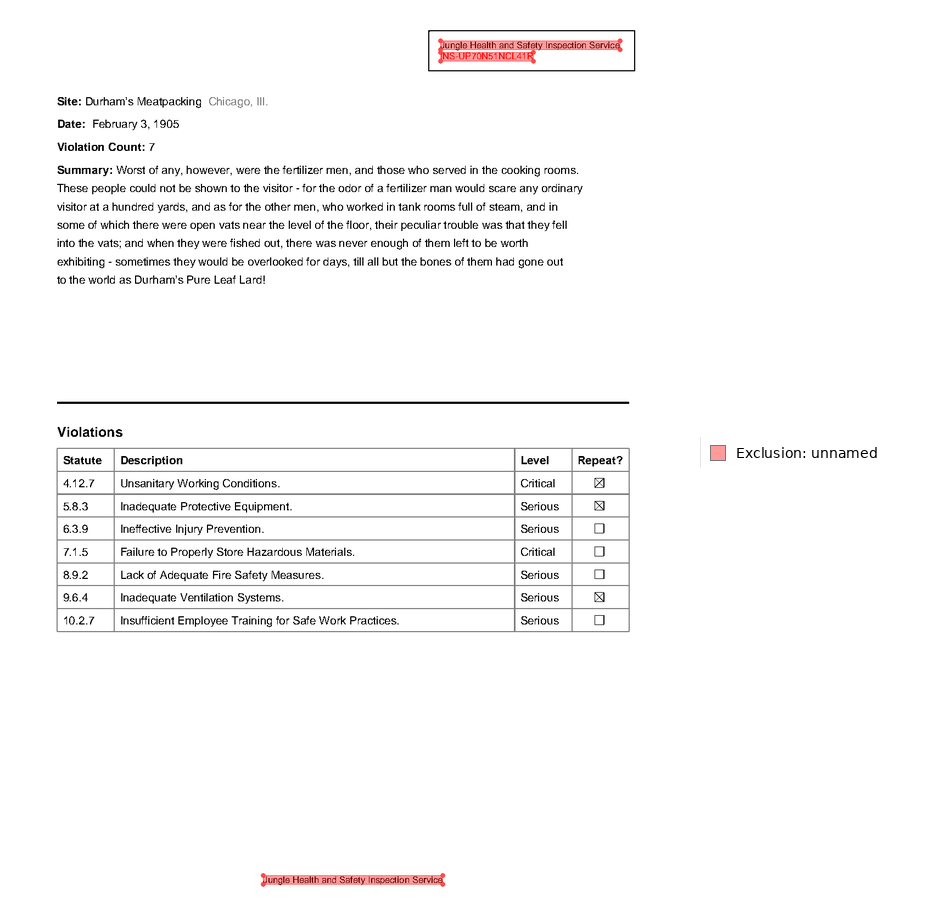
"Jungle Health" in page.extract_text()FalseExclusions are read-time filters, not deletions — page.clear_exclusions() restores the full view. At the document level, pdf.add_exclusion(lambda page: ...) applies a rule to every page, which is how you strip headers from a 300-page file in one line.
page.clear_exclusions()"Jungle Health" in page.extract_text()Truepdfplumber reads the text layer that’s in the file; if the page is a scan, there’s nothing to read. Natural PDF adds an OCR pipeline behind the same API — after apply_ocr(), the recognized words are regular text elements, so every selector and extraction above works unchanged.
pip install "natural-pdf[all]"pdf = PDF("scanned-report.pdf")page = pdf.pages[0]page.apply_ocr() # default engine: rapidocr, models ship with the packagepage.extract_text()(Not executed here — this page’s fixture is a digital PDF. See the install page for the other engines: paddle, easyocr, surya, doctr, and VLM-backed OCR.)
Escape hatch: the raw pdfplumber page
Section titled “Escape hatch: the raw pdfplumber page”The underlying pdfplumber page object is reachable at page._page:
type(page._page)pdfplumber.page.PageThis is an internal attribute, not a supported API — it can change without notice. Use it to cross-check Natural PDF output against raw pdfplumber while migrating, not as a foundation to build on. If you need something from pdfplumber that Natural PDF doesn’t expose, open an issue.
Done comparing — close both handles:
plumber_pdf.close()pdf.close()Appendix: coming from PyMuPDF
Section titled “Appendix: coming from PyMuPDF”Natural PDF does not wrap PyMuPDF, so this is a translation table rather than an interop story. Coordinates transfer cleanly — both libraries use points with the origin at the top-left.
PyMuPDF (fitz) | Natural PDF |
|---|---|
doc = fitz.open("report.pdf") | pdf = PDF("report.pdf") |
page = doc[0] | page = pdf.pages[0] |
page.get_text() | page.extract_text() |
page.get_text("words") | page.find_all('text') — style runs, not whitespace-split words |
page.search_for("Total") | page.find_all('text:contains("Total")') — returns elements, not bare rects |
page.get_pixmap(dpi=150) | page.render(resolution=150) — a PIL image; page.show() is the same with highlights |
page.find_tables() | page.extract_table() / page.extract_tables() |
doc.close() | pdf.close() |
The behavioral differences called out for pdfplumber apply here too: text elements are style runs with attributes, tables come back as TableResult, and exclusions/OCR/selectors have no PyMuPDF counterpart. Spot-check a page or two of output after translating — word segmentation and reading order are computed differently in the two libraries.
- Quickstart — the 15-minute end-to-end path.
- Concepts — elements, regions, and exclusions in depth.