Tables: the Recovery Ladder
A PDF table is not a table. It’s loose text floating over (maybe) some lines. Recovering the grid means answering one question: where do the row and column boundaries go? Different documents leave different evidence, so table extraction is a ladder — start at the top rung, drop down only when the current rung’s evidence isn’t there.
The rungs, in order:
- Bordered table →
extract_table()and you’re done. - Ruled but messy → build
Guidesfrom detected lines, edit them, extract. - Borderless → build
Guidesfrom headers and content alignment, snap to whitespace. - Row-keyed records → anchor rows on a reliable column (
extract_table_guided). - Scanned image → OCR first, then re-enter the ladder with OCR elements.
Every rung ends the same way: a TableResult whose .to_df() gives you a pandas DataFrame (first row becomes the header by default; pass header=None or header=1 etc. when it shouldn’t).
Rung 1: bordered — extract_table()
Section titled “Rung 1: bordered — extract_table()”When the table has real ruling lines around its cells, pdfplumber’s lattice detection reads the grid straight from the geometry:
from natural_pdf import PDF
pdf = PDF("pdfs/01-practice.pdf")page = pdf.pages[0]
page.extract_table().to_df()| Statute | Description | Level | Repeat? | |
|---|---|---|---|---|
| 0 | 4.12.7 | Unsanitary Working Conditions. | Critical | <NA> |
| 1 | 5.8.3 | Inadequate Protective Equipment. | Serious | <NA> |
| 2 | 6.3.9 | Ineffective Injury Prevention. | Serious | <NA> |
| 3 | 7.1.5 | Failure to Properly Store Hazardous Materials. | Critical | <NA> |
| 4 | 8.9.2 | Lack of Adequate Fire Safety Measures. | Serious | <NA> |
| 5 | 9.6.4 | Inadequate Ventilation Systems. | Serious | <NA> |
| 6 | 10.2.7 | Insufficient Employee Training for Safe Work P... | Serious | <NA> |
That’s the whole rung. extract_table() auto-detects a strategy (method='auto'); you can force one with method='lattice' (ruling lines), method='stream' (whitespace alignment), or method='tatr' on a TATR-detected table region. If the result above had come back with merged columns or missing rows, that’s the signal to drop a rung — not to start tweaking table_settings blind.
Rung 2: ruled but messy — Guides.from_lines()
Section titled “Rung 2: ruled but messy — Guides.from_lines()”Real documents rarely rule only the table. Headings get underlined, sections get separators, and automatic detection sweeps them all in. Guides makes the grid an explicit, editable object:
from natural_pdf.guides import Guides
guides = Guides.from_lines(page, detection_method='vector')guides.show()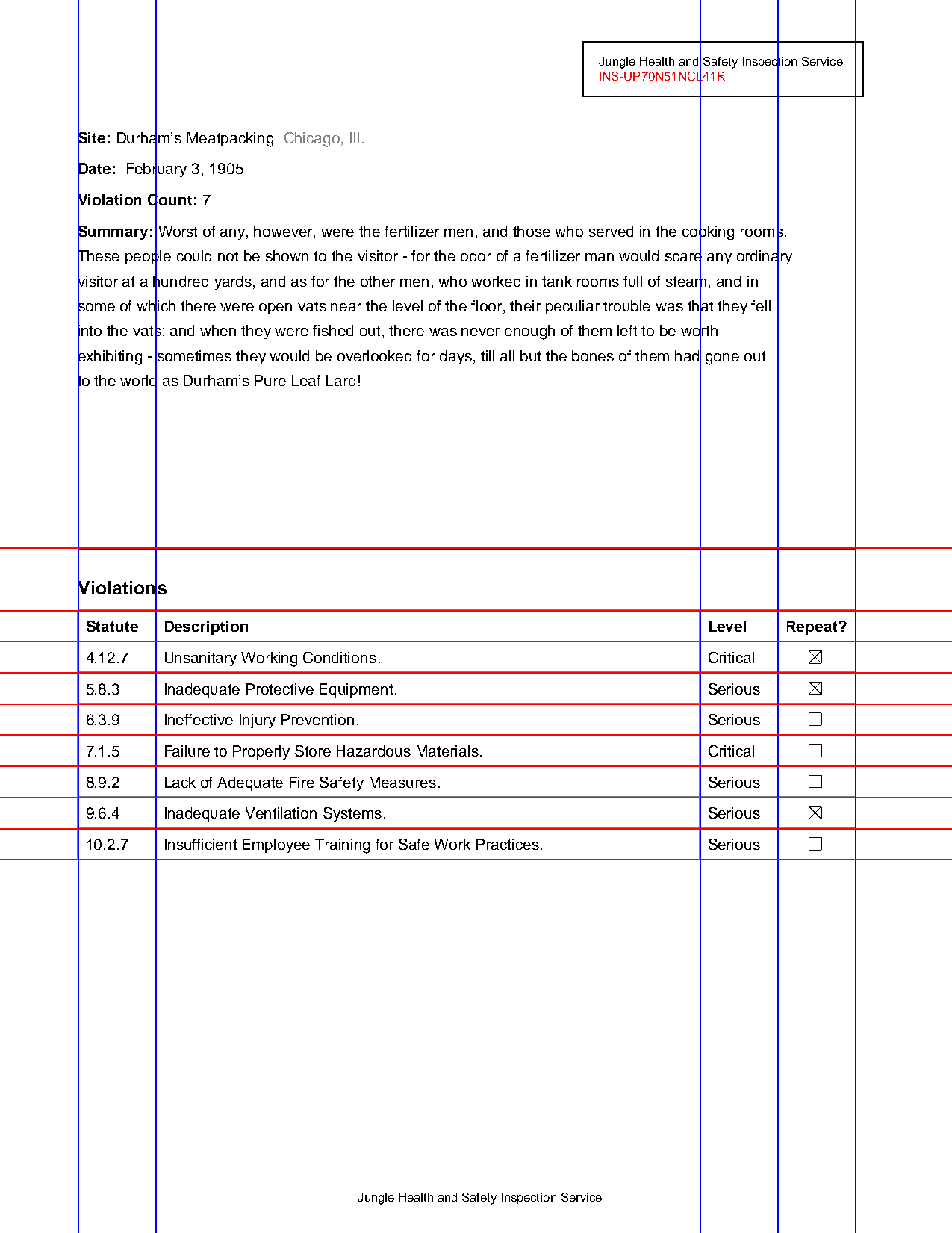
list(guides.horizontal)[352.0, 392.0, 412.0, 432.0, 452.0, 472.0, 492.0, 512.0, 532.0, 552.0]The verticals are right, but the first horizontal (352.0) is the underline of the “Violations” heading — a ruling line that isn’t part of the table. Left alone, it creates a junk band above the real header row:
guides.extract_table().to_df().head(2) # header row is garbage| Violation | s | None | None | |
|---|---|---|---|---|
| 0 | Statute | Description | Level | Repeat? |
| 1 | 4.12.7 | Unsanitary Working Conditions. | Critical | None |
Guides are just two lists of coordinates, so fix them like lists:
guides.horizontal.remove_at(0) # drop the heading underlineguides.extract_table().to_df().head(3)| Statute | Description | Level | Repeat? | |
|---|---|---|---|---|
| 0 | 4.12.7 | Unsanitary Working Conditions. | Critical | None |
| 1 | 5.8.3 | Inadequate Protective Equipment. | Serious | None |
| 2 | 6.3.9 | Ineffective Injury Prevention. | Serious | None |
detection_method='vector' reads the PDF’s actual line elements. When rulings are drawn as thin rectangles or only exist visually, use detection_method='pixels', which renders the page and scans for dark runs — its threshold (fraction of the page span a line must cover) is the main knob, and too-low values hallucinate guides from text strokes. Other editing tools: add(), shift(), remove_at(), slicing, and guides.show() after every change, because a wrong grid produces a plausible wrong table.
Rung 3: borderless — headers + content + whitespace
Section titled “Rung 3: borderless — headers + content + whitespace”No lines at all: the evidence is alignment. Column boundaries live in the whitespace between header words; row boundaries live where each record starts. Build each axis from its own evidence:
pdf2 = PDF("pdfs/tiny-text-tables.pdf")p2 = pdf2.pages[0]
words = p2.find_all('text')first_top = min(w.top for w in words)headers = [w for w in words if w.top < first_top + 2]   # the header row[h.text for h in headers[:6]]
['OFFICER',
'DATE OF REPORT',
'DATE OF FORCE',
'TIME OF FORCE',
'PRECINCT',
'CASE #']g = Guides(p2)g.vertical.from_headers(headers) # columns: valleys between header wordsg.vertical.snap_to_whitespace() # nudge each guide into the nearest text gapg.horizontal.from_content(markers='text', align='top', outer=True) # rows: every text line(len(g.vertical), len(g.horizontal))(26, 295)g.extract_table().to_df().iloc[:3, :6]| OFFICER | DATE OF REPORT | DATE OF FORCE | TIME OF FORCE | PRECINCT | CASE # | |
|---|---|---|---|---|---|---|
| 0 | PFEIFER, TIM | 12/2/2016 | Dec-02-2016 | 22:30 | WEST | 23-2016-18335 |
| 1 | NICHOLSON, DUSTIN | 12/3/2016 | Dec-03-2016 | 6:45 | WEST | 23-2016-18348 |
| 2 | JENNINGS, ERIK | 12/7/2016 | Dec-07-2016 | 13:05 | EAST | 23-2016-18571 |
25 header cells became 26 column guides, and every text line became a row boundary — a working grid from a page with zero ruling lines. The pieces are independent and swappable:
from_headers(...)places each column boundary where it crosses the fewest text boxes below the headers (method='min_crossings';'seam_carving'allows boundaries that bend around ragged columns).from_content(markers=...)puts a guide at each matched element —markerscan be a selector string, a list of strings to search for, or anElementCollection.align='between'centers boundaries in the gaps instead of on the elements.snap_to_whitespace()shifts existing guides into the nearest whitespace valley, which cleans up guides that clip characters.from_whitespace()finds valleys on its own when even headers are unreliable.
Rung 4: row-keyed records — anchored rows
Section titled “Rung 4: row-keyed records — anchored rows”Some listings aren’t line-per-row: each record wraps across several lines, but one column is dependable — every record starts with a name, a date, a case number. Anchor rows on that column and let the header logic handle columns:
result = page.extract_table_guided( headers=["OFFICER", "DATE OF REPORT", "PRECINCT"], # or an ElementCollection row_anchors='text[x0<40]', # one match per record: the left key column)result.to_df()extract_table_guided(headers, row_anchors) is the shortcut; Guides.from_headers_and_row_anchors(...) is the same construction when you want to inspect or edit the guides before extracting. Row guides land between consecutive anchors (row_align='between' by default), so multi-line cells stay inside their record’s band.
Rung 5: scanned pages — OCR, then climb again
Section titled “Rung 5: scanned pages — OCR, then climb again”A scanned table has no text elements, so every rung above sees an empty page. OCR is not a table strategy — it’s the step that creates the elements the ladder needs:
page.apply_ocr(engine="rapidocr") # downloads/loads an OCR model on first usepage.extract_table().to_df() # now re-enter the ladder at rung 1After apply_ocr(), OCR’d words are ordinary elements: from_headers, from_content, and snap_to_whitespace all work on them (rulings on a scan need detection_method='pixels', since a scan has no vector lines). Two OCR-specific tools change the order of operations when recognition quality is the bottleneck:
- Grid first, OCR per cell: build guides on the scan, then
g.cells.apply_ocr(...)recognizes each cell’s crop separately — misread text can’t bleed across cell boundaries, andg.cells.plan_ocr(...)previews the windows before spending compute. - Fix text after the fact: OCR’d elements keep their boxes, so a garbled header still anchors
from_headers, and the:ocr()selector finds anchors despite confusable characters.
Expect to iterate: OCR quality gates everything downstream, and page.compare_ocr(engines=[...]) exists precisely because the best engine varies by document.
Choosing a rung quickly
Section titled “Choosing a rung quickly”Render the page and look: full borders → rung 1. Some lines, wrong lines, or lines-plus-junk → rung 2. Clean columns, no ink → rung 3. Multi-line records with a key column → rung 4. find_all('text') comes back empty → rung 5, then start over. And at every rung, the debugging move is the same — draw the grid (guides.show()) before trusting the DataFrame.