The Spatial Model
Natural PDF’s core idea: a PDF page is a flat canvas of boxes. Every character, word, line, rectangle, and image is a box with four coordinates — x0 (left), top, x1 (right), bottom — measured in points (72 per inch) from the top-left corner of the page. There is no DOM, no paragraphs, no reading order stored in the file. Whatever structure you see is structure you (or a model) impose on the boxes.
Almost everything the library does reduces to two operations:
- Find boxes that match a description (selectors).
- Make new boxes relative to boxes you found (spatial navigation), then read whatever falls inside them.
Elements vs. regions
Section titled “Elements vs. regions”- An element is a box that carries content: a word with its text, a line with its stroke, a rect, an image. Elements come from the PDF itself, from OCR, or from layout detection.
- A region is just a rectangle you defined — it has no content of its own. When you call
region.extract_text()orregion.find_all(...), the region collects whatever elements happen to fall inside its bounds at that moment. Run OCR afterward and the same region will pick up the new elements too.
Directional methods (.above(), .below(), .left(), .right()) take an element (or region) and return a new Region. That’s the whole navigation model: anchor on something findable, then grab the area where the answer lives.
from natural_pdf import PDF
pdf = PDF("pdfs/01-practice.pdf")page = pdf.pages[0]
label = page.find('text:contains("Site:")')label.show(crop=50)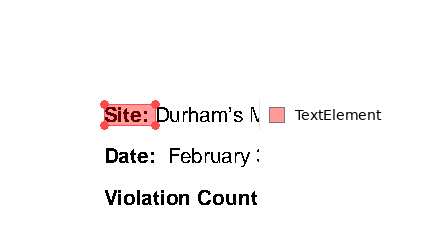
.right() and .left() stay in the row
Section titled “.right() and .left() stay in the row”.left() and .right() default to height='element' — the region is exactly as tall as the source element. The overwhelmingly common reason to look sideways is a form row: a label on the left, its value on the right. Matching the source’s height keeps the region from swallowing the rows above and below.
value = label.right() # height='element' by default: same row onlyvalue.show(crop=50)
value.extract_text()'Durham’s Meatpacking Chicago, Ill.'.above() and .below() span the full width
Section titled “.above() and .below() span the full width”.above() and .below() default to width='full' — the region spans the entire page width. Looking up or down usually means “the section under this heading” or “everything above this footer,” and sections are page-wide. If .below() matched the source element’s width, a heading three words wide would produce a three-words-wide column and silently drop most of the section.
region = label.below(height=60) # width='full' by defaultregion.show(crop=30)
The two defaults differ because the two gestures differ: sideways = same row, vertical = whole band. Pass the other mode when you need it: label.below(width='element') gives a column as wide as the source.
One direction takes a number, the other takes a mode
Section titled “One direction takes a number, the other takes a mode”Each directional method has two size controls, and they are not interchangeable:
- The travel direction takes a number:
below(height=60)means “extend 60 points down.” Omit it and the region runs to the page edge. - The cross direction takes a mode string:
below(width='full')orbelow(width='element'). Nothing else.
A number in the mode slot raises TypeError:
try: label.below(width=200)except TypeError as e: print(e)below() got width=200: width selects the cross-direction mode and must be 'full' or 'element'. Use height=<number> to control how far the region extends below; for a custom cross-size, use below(width='element').expand(...) or page.region(...).This is deliberate. Before 0.7, below(width=200) was silently treated like width='element' — you got a plausible-looking region with the wrong bounds, and nothing told you. It was the single most-reported silent-wrong behavior from both users and LLM agents (the parameter looks like it should take a number). Since a wrong-but-plausible region poisons everything downstream, the mode slot now rejects numbers loudly and the error message points at the two escape hatches: below(width='element').expand(...) for a custom cross-size, or page.region(x0, top, x1, bottom) when you already know the coordinates.
until=: extend to a boundary instead of a distance
Section titled “until=: extend to a boundary instead of a distance”Fixed distances break the moment a document adds a line. until= takes a selector and stops the region at the first match in that direction:
between = label.below( include_source=True, # keep the "Site:" row itself until='text:contains("Violation Count")', # stop here include_endpoint=False, # ...but don't include it)between.show(crop=30)
between.extract_text()'Site: Durham’s Meatpacking Chicago, Ill.\nDate: February 3, 1905'include_endpoint=True (the default) extends through the boundary element; False stops just short of it, backed off by a tiny offset (0.01 pt by default, configurable via natural_pdf.options.layout.directional_offset) so the boundary element doesn’t bleed in.
Anchors: which edge starts the search
Section titled “Anchors: which edge starts the search”anchor= controls which edge of the source is the reference line when deciding whether an until candidate lies “in that direction.” The default 'start' means the shared boundary edge — for .below() that’s the source’s bottom, so only candidates starting at or below it qualify. anchor='end' uses the opposite edge (for .below(), the source’s top), which lets elements that vertically overlap the source count as boundaries — useful when a stamp or side note sits on the same line as your anchor. You can also name an explicit edge ('top', 'bottom', 'left', 'right') or 'center'.
within=: hard bounds
Section titled “within=: hard bounds”within=some_region constrains the whole operation: the until search happens inside that region instead of the whole page, and the final result is clipped to it. If the intersection is empty, the method returns None — check for it. within cannot combine with multipage=True (that raises ValueError), because a same-page clip and a cross-page region contradict each other.
Crossing pages
Section titled “Crossing pages”All four methods accept multipage=True. When the region would run past the page edge (or until= only matches on a later page), you get a FlowRegion spanning pages instead of a Region. See the flows documentation for what a FlowRegion can and can’t do.
Exclusions ride along
Section titled “Exclusions ride along”Navigation respects exclusions by default (apply_exclusions=True):
- Elements inside excluded zones are invisible to the
until=search, so a boundary selector won’t lock onto a footer you’ve excluded. - Reads on the resulting region (
extract_text(),find_all()) apply exclusions too.
page.add_exclusion(page.region(0, 0, page.width, 60), label="letterhead")
whole_page = page.region(0, 0, page.width, page.height)print(whole_page.extract_text()[:60])                          # letterhead goneprint(whole_page.extract_text(apply_exclusions=False)[:60])    # letterhead back
Site: Durham’s Meatpacking Chicago, Ill.
Date: February 3, 1
Jungle Health and Safety Inspection Service
INS-UP70N51NCL41The exclusion didn’t delete anything — it filtered the read. That distinction is the subject of Exclusions.